Djinious
DjiniousDataKnowledge base

A number without its rowsis an opinion.

API-first data platformAssignOperate

DjiniousData ingests the files, connectors and streams you already have, models them as your domain instead of ours, and keeps every dashboard tile, alert and AI answer attached to the records it was computed from. Click a finding and you land on the evidence.

DjiniousData
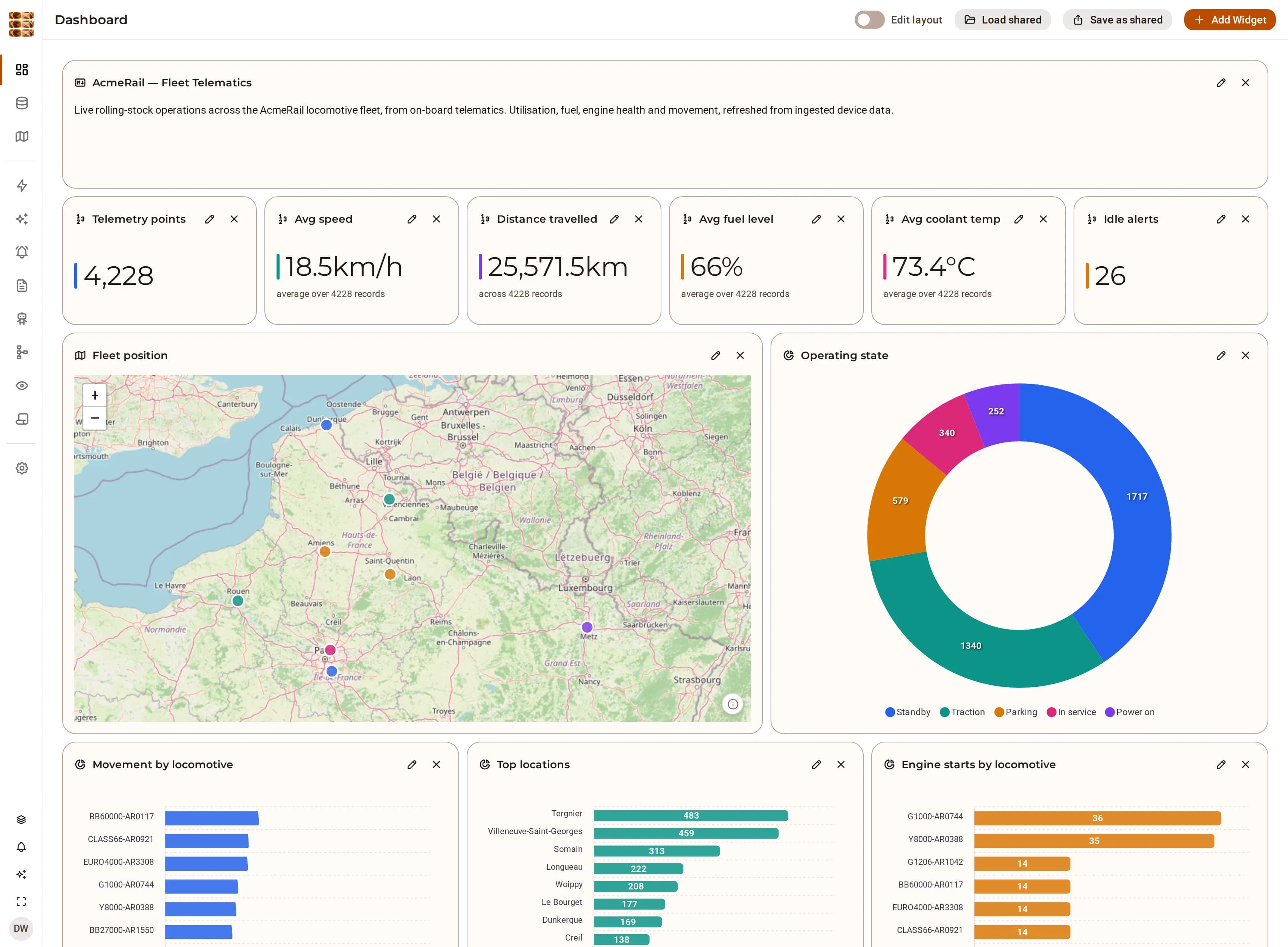
The AcmeRail fleet-telematics dashboard in DjiniousData: telemetry-point, speed, distance, fuel, coolant and idle-alert tiles above a live fleet map of northern France and Belgium, an operating-state donut, and per-locomotive breakdowns.
A fleet-operations dashboard assembled from ingested telematics. Every tile is a live aggregate over the underlying records — not a stored snapshot — so the map, the state mix and the health trends all answer from the same rows. Seeded development stack, AcmeRail fixture.
entity types compiled in
0entity types compiled inthe ontology is data, not code
ingestion stages, provenance enforced
7ingestion stages, provenance enforcedparse · normalize · dedupe · acl · enrich · embed · persist
MCP tools, the same auth as the UI
46MCP tools, the same auth as the UIscoped API tokens · no side door
the line between merged and candidate
0.85the line between merged and candidatebelow it a match waits for an analyst

What it is

One platform for the ingest, the model, the graph and the answer

Most data stacks are four products stitched together: something that loads, something that models, something that charts, and something that finally lets an AI near it. Each keeps its own copy of who may see what, and the lineage dies at every seam. DjiniousData is one API-first control plane, and every capability exists as an endpoint before it exists as a screen.

Unified ingestion

CSV, Excel, PDF, DOCX, JSON and Markdown from the document store; external systems through connector plugins; video and live camera through the vision pipeline. Everything lands as a knowledge object carrying its own provenance, and an object whose provenance does not validate is refused rather than stored.

files · connectors · plugins · streams

Runtime ontology

Entity and relation types are defined through the UI or the API and stored in the database — not declared in a schema file and shipped in a release. An organization can layer its own fields, labels and status workflow over a shared base type without forking it.

entity types · relation types · per-org overlays

Offline-first enrichment

Entities, keywords, topics, sentiment and language are extracted by a deterministic offline enricher that needs no model and no network. An LLM improves the result when one is configured; it is never the thing standing between your data and being usable.

deterministic, with the LLM as an accelerant

Entity resolution

Records that describe the same thing are clustered by blocking and pairwise scoring. Above 0.85 the platform merges; between 0.7 and 0.85 it holds the pair as a candidate for a human, and records the analyst’s decision so the next run honours it.

identifier 1.0 · exact name 0.85 · fuzzy 0.7

Knowledge graph

Resolved entities are related into a navigable graph whose edges carry the objects they were derived from. Traversal is ACL-scoped before it returns a neighbour, so the graph cannot become the path around the permissions.

edges with evidence, not just arrows

Dashboards, alerts and reports

Widgets query the underlying objects directly, so a tile is always current and always traceable. Alert rules watch an aggregate of a field per group and fire on a threshold. Reports cite the rows behind each section.

aggregates over records, computed on read

Inside the product

See it working.

Every capture below is the running product.

01 · Ingest

Every row becomes an object that knows where it came from

Point the platform at a folder of documents, a connector or a camera. Each row, page or run becomes a knowledge object: parsed, normalised, deduplicated on a content hash, permission-mapped, enriched, embedded and persisted — with the source system, the source object id and the ingestion time recorded on the way past.

  • CSV, XLS/XLSX, PDF, DOCX, JSON, Markdown and plain text, one object per tabular row
  • Numeric columns also stream to a time-series store, so telemetry charts and threshold rules work on the same load
  • Deduplication is by content hash against the source’s own object id — re-ingesting a file is a no-op, not a second copy
DjiniousData
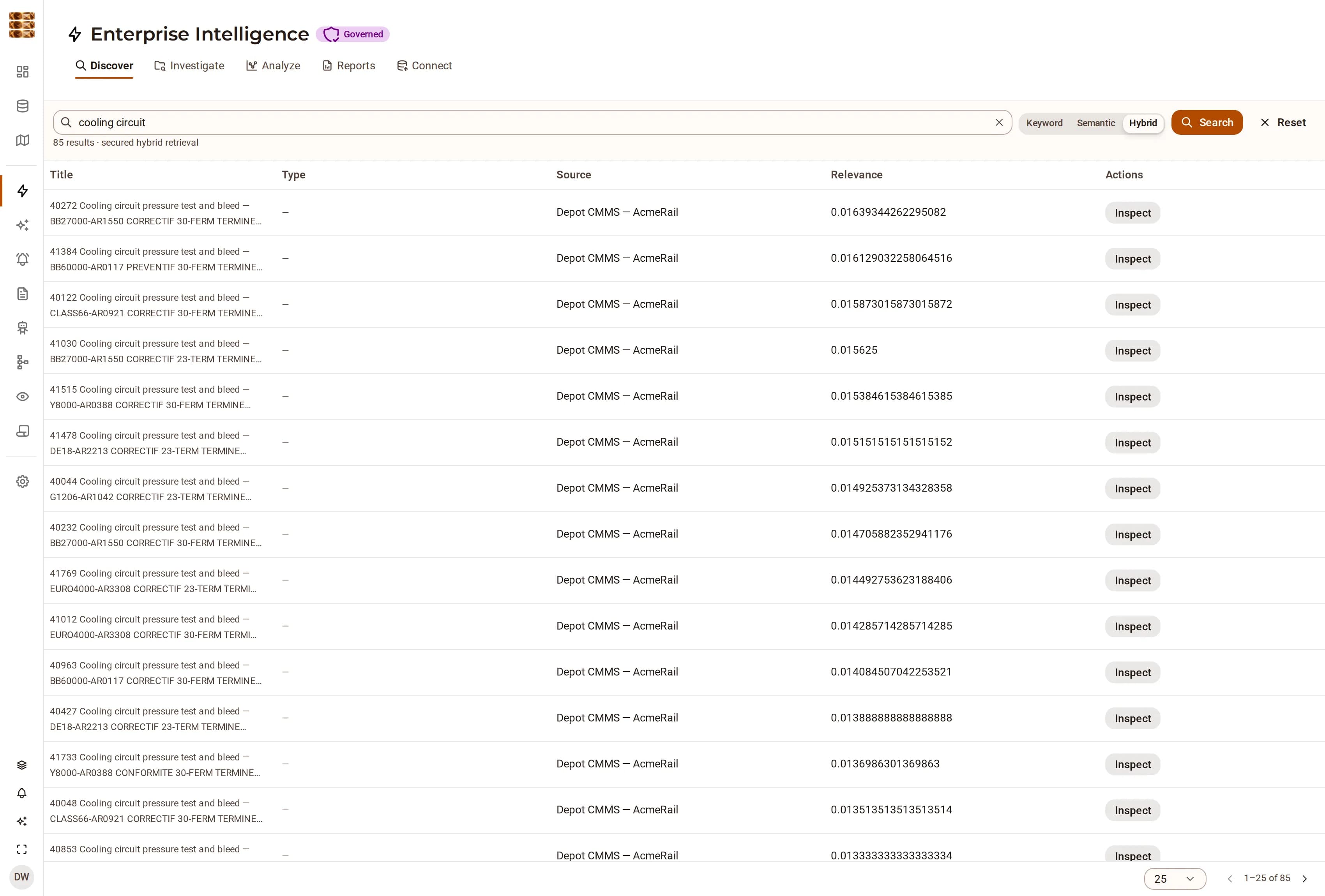
DjiniousData search results for one locomotive: rows of ingested telemetry, each carrying its source name, its relevance score and an Inspect action.
What ingestion produces, whichever door the data came through: one searchable object per row, carrying the source it came from and opening onto the record itself.

02 · Model

Describe your domain, and the platform builds around it

Describe your domain as entity types and relation types — fields, labels, icons, a status workflow — and the platform builds the CRUD, the list views, the detail pages, the search facets and the agent tools around them. No migration, no deploy, no code.

  • Types are stored records: create one at 11:00 and its list view exists at 11:00
  • Per-organization overlays layer fields and workflows over a shared base type without forking it
  • The AI assistant can propose a type from the data it has ingested, and you approve or reject the proposal
DjiniousData
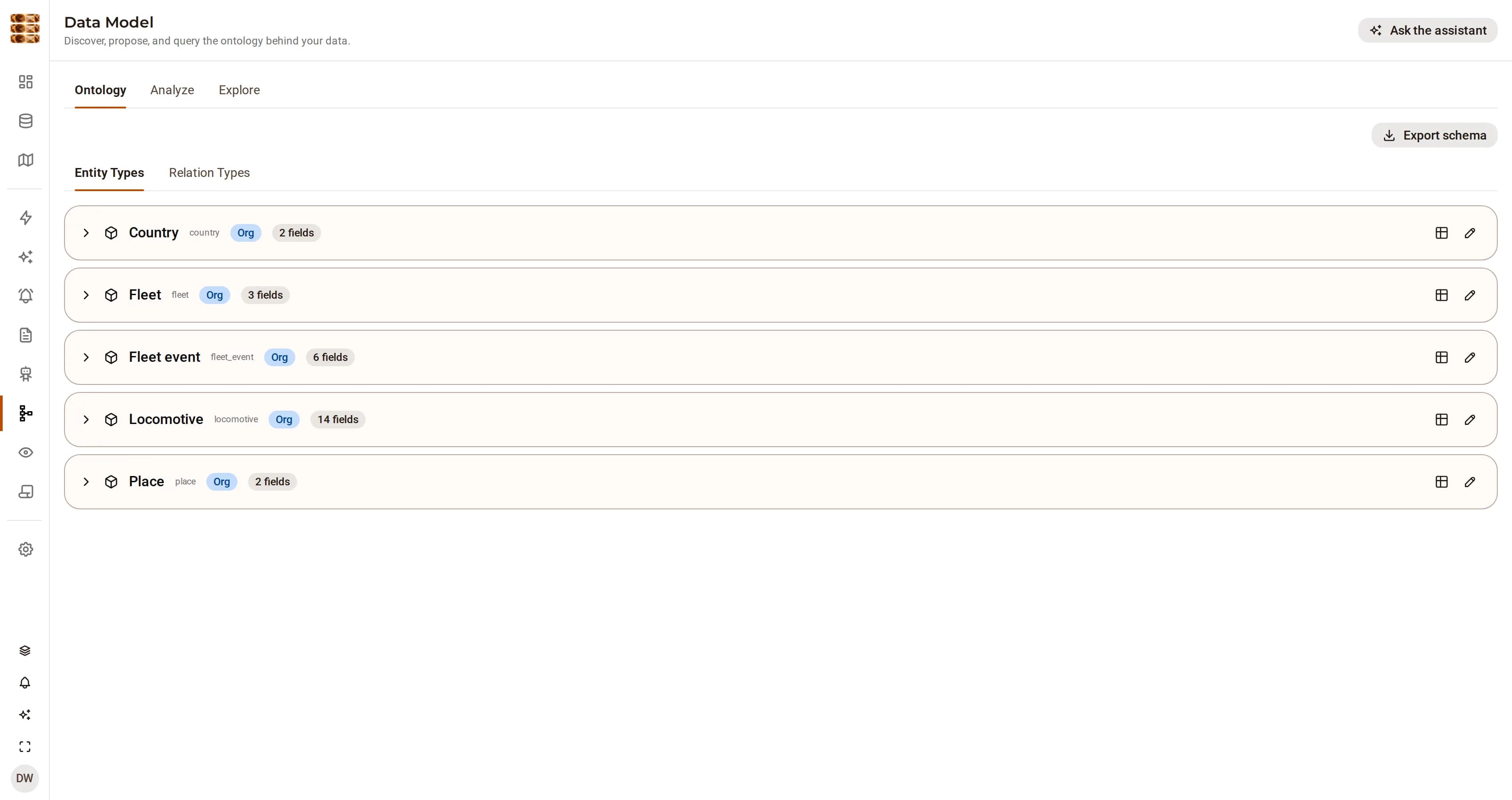
The DjiniousData data model page listing AcmeRail’s five entity types — country, fleet, fleet event, locomotive and place — each badged as owned by the organization.
Five types, defined at runtime and owned by the organization rather than the platform. Each one got its list view, detail page and agent tools without a line being written for it.

03 · Resolve

Cluster what is the same, and keep the evidence on the edge

Cluster the records that describe the same real thing, relate the clusters into a graph, and keep the evidence on the edge. Every entity is also related to the organization that owns it, as a derived relation the platform synthesises rather than a stored edge you have to remember to write.

  • Blocking, pairwise scoring and union-find clustering, all offline and deterministic
  • Fuzzy matches below the auto-merge line stay candidates, and an analyst’s decision is honoured on the next run
  • Graph traversal is ACL-scoped before it returns a neighbour, not filtered after
DjiniousData
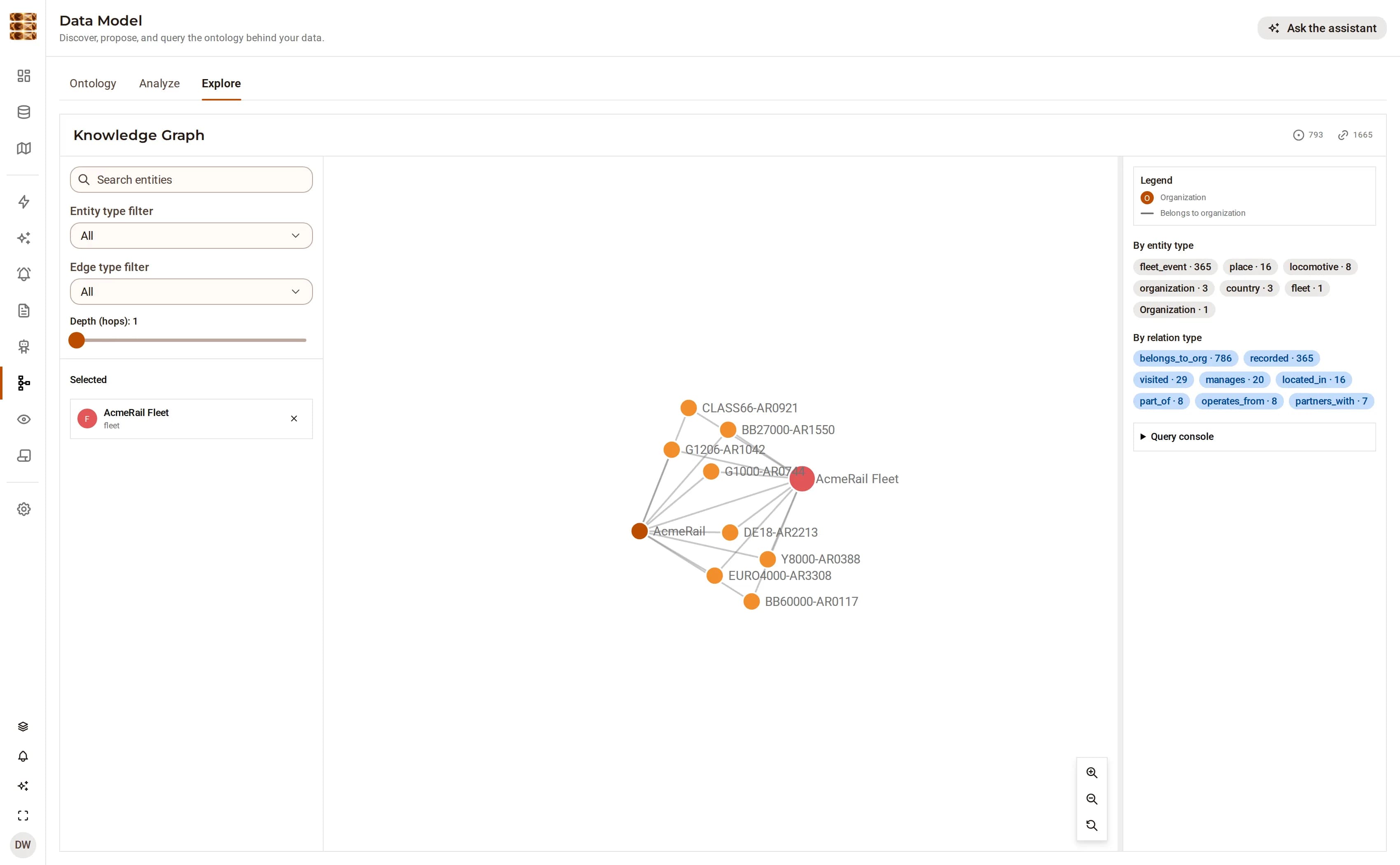
The DjiniousData knowledge graph explorer showing the AcmeRail fleet node connected to its eight locomotives and to the AcmeRail organization.
The fleet, its eight units and the organization they belong to. The organization edge is derived from the record rather than stored, so it cannot fall out of step with it.

04 · Signals

Findings that arrive with their evidence attached

Analysis produces signals — anomalies, patterns, weak signals — each with a subject, a method, a confidence and references to the knowledge objects it was computed from. Severity is derived from confidence rather than assigned, so two findings at the same confidence cannot be ranked differently by whoever wrote them.

  • Signal summaries interpolate measured aggregates, never hard-coded figures
  • Each signal carries references to the knowledge objects it was drawn from
  • One search over entities, documents, events and insights — keyword, semantic or hybrid — with every hit opening onto the record behind it
DjiniousData
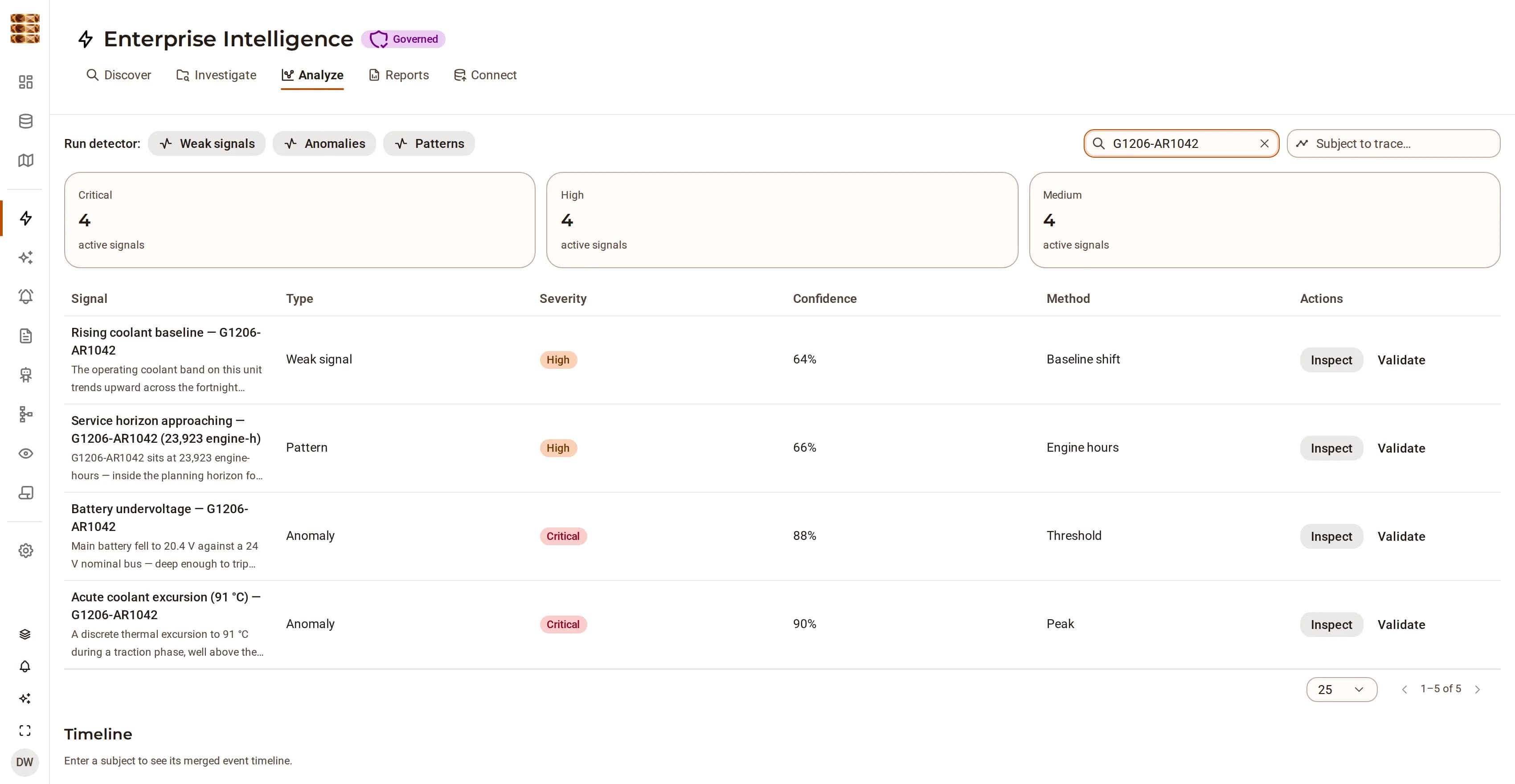
The DjiniousData Analyze view, filtered to locomotive G1206-AR1042: five findings — three critical — each with its type, severity, confidence, method and an Inspect action, above a severity summary of the whole fleet.
Twelve findings over a fortnight of fleet telemetry, filtered here to one locomotive. Severity is derived from confidence rather than assigned, and every row opens onto the readings behind it.

05 · From finding to action

A rule that fires is the start of the thread, not the end of it

An alert without a case is a notification somebody eventually stops reading. The platform’s path runs the other way: the rule fires, the signal explains what was measured and what it implies, the case collects the evidence and assigns an owner, and the report is what leaves the building.

  • Alert rules fire on a max, min, average or count of a whitelisted field over a source, per group
  • Alert history keeps the observed value and the threshold beside each firing, so a rule that is too sensitive is visible as such
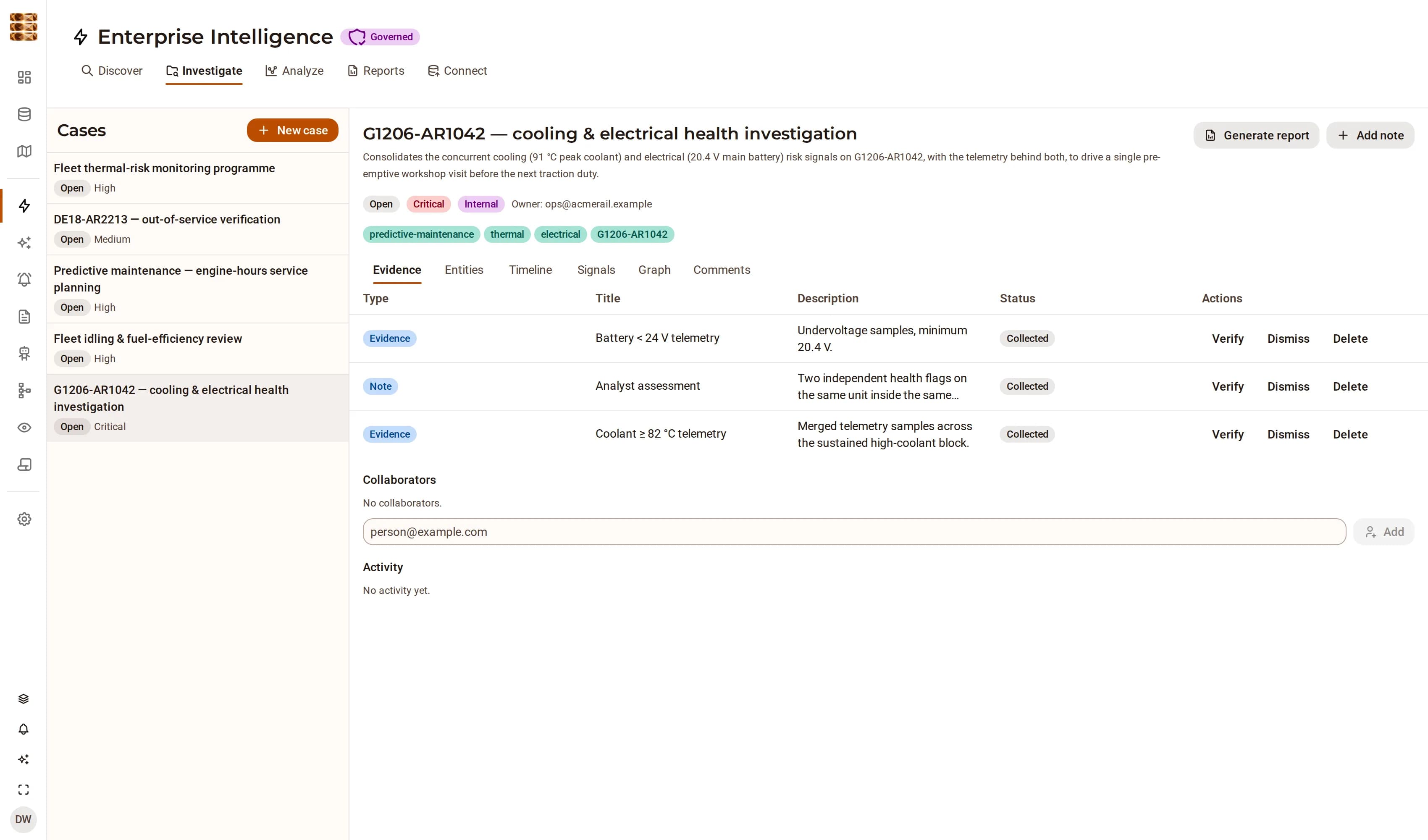
  • Cases carry collaborators, tags, comments and an activity trail, and their evidence items keep their references back to the source objects
DjiniousData
An open investigation case for locomotive G1206-AR1042 consolidating its cooling and electrical risk signals, with three collected evidence items, its tags, its owner and its activity trail.
The case that consolidates the fleet’s two concurrent health flags on one unit. Its evidence items keep their references to the telemetry rows the flags were computed from.

06 · Reports

A figure in a report and the tile it came from cannot disagree

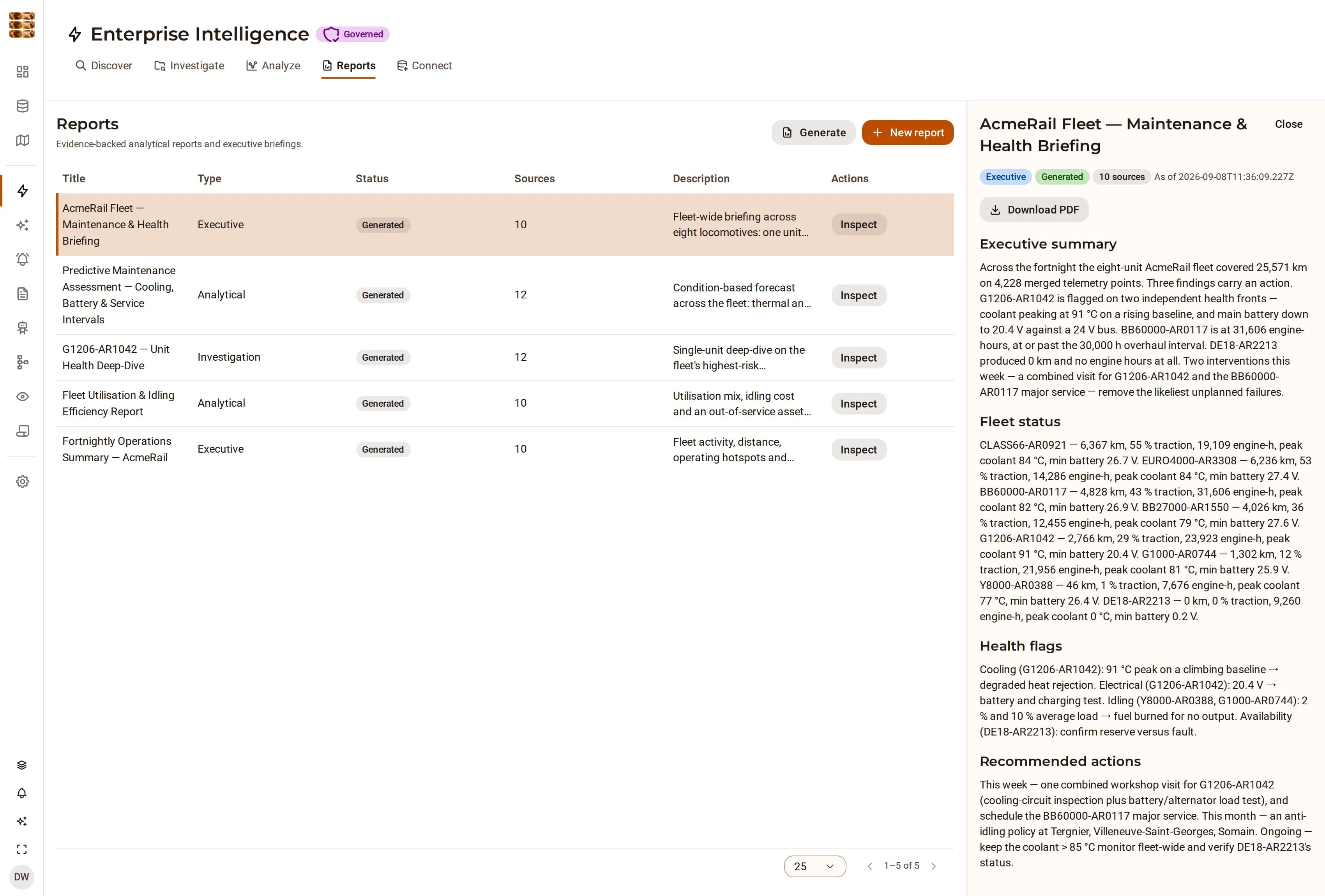
Structured reports whose sections are typed — narrative, entities, signals — and whose citations point at records rather than at other prose. A report is generated from the platform’s state, and can be generated from a case, keeping the link back to it. PDF and Excel export read the same records the screen is reading.

  • Typed sections, with citations back to the source objects
  • Reports generated from a case keep the link back to it
  • The API is not a subset of the UI; the UI is a consumer of the API
DjiniousData
A generated AcmeRail fleet maintenance and health briefing, with an executive summary, per-unit fleet status, health flags and recommended actions, each section citing the telemetry it draws on.
The briefing quotes distance, engine hours, peak coolant and minimum bus voltage per unit — all read from the ingested telemetry rather than written into the prose.

AI & agents

An agent inside the permission model, not beside it

The assistant is not a wrapper that reads your screen. It calls the same REST API you do, as the principal you are, in the organization you are in — so there is no second permission model to keep in step with the first, and nothing it can reach that you could not.

01

Every write is approved

Read tools run freely; the tools that create, update, delete or relate anything stop and render an approve/reject card in the conversation. You see the exact call and its arguments before it happens.

02

Its reach is a role, not a prompt

Tools are gated server-side by the caller’s role. A viewer’s assistant is not told to behave; it is handed a smaller catalogue. There is no instruction to jailbreak, because the write tools were never in the conversation to begin with.

03

It answers with the platform’s own components

When the assistant reports on system health, a vision run or a set of entities, it renders the same React component the rest of the app uses for that data. You are looking at the platform’s view of the record, not at the model’s paraphrase of it.

04

It can ask, and secrets stay server-side

The agent can pause mid-task for free text, a choice, or a password. A sensitive answer is stashed server-side and reaches the model only as a reference — so a credential can be used by a tool without ever entering the transcript.

05

46 MCP tools, over the same handlers as the REST API

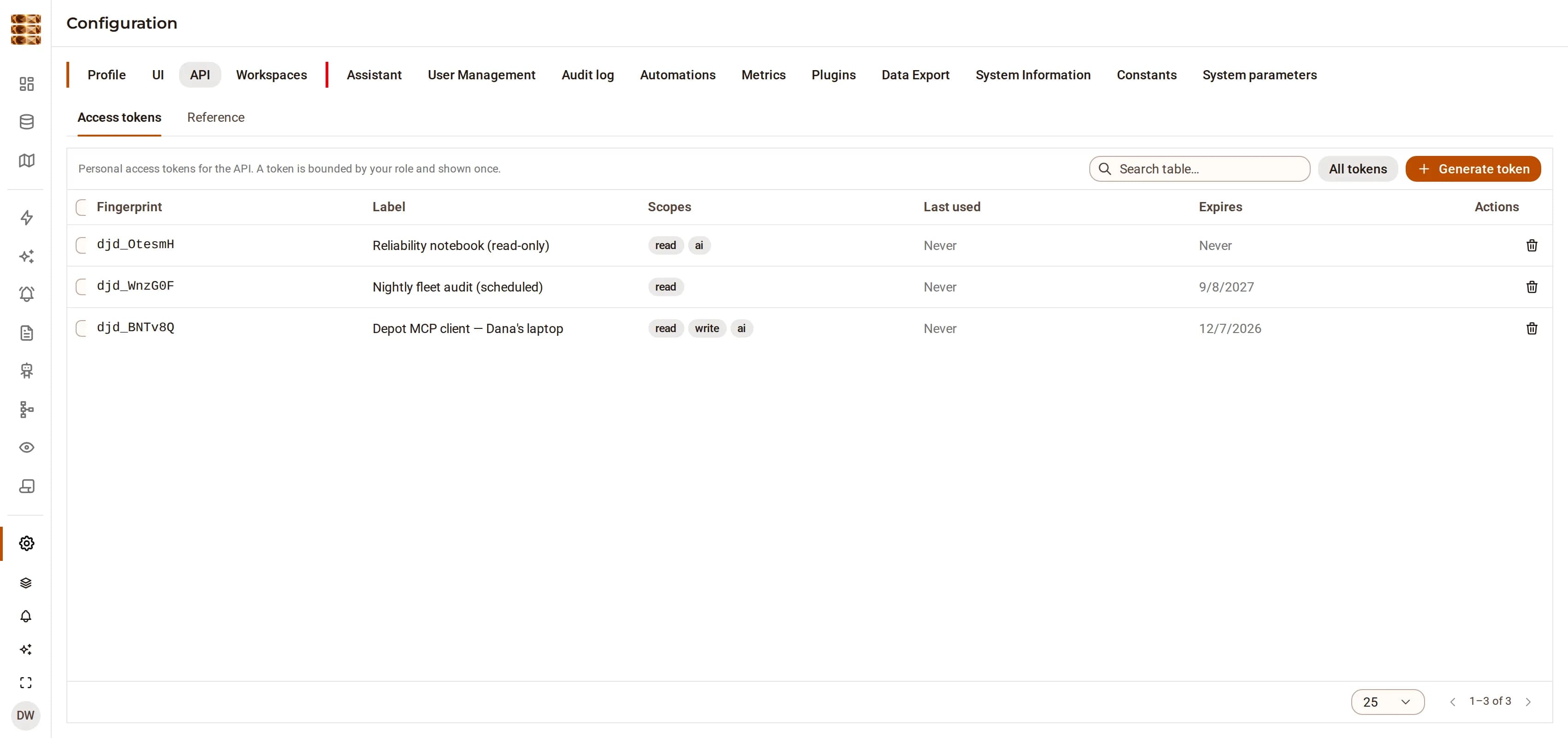
Agents outside the app reach the platform through a Model Context Protocol server that threads the API key’s principal into the same handlers the HTTP routes call. Per-token scopes — read, write, admin, ai — are bounded by the owner’s own role, and only the SHA-256 hash of a token is stored.

06

The assistant proposes an ontology; only a person adopts one

Pointed at what has been ingested, the agent infers entity types, their fields and the relations between them, and writes the result as a proposal record. Accepting one creates the types through the same API a person would use; nothing changes on a model’s own authority.

DjiniousData
The API access tokens panel in DjiniousData settings, listing three minted tokens for an MCP client, a scheduled audit and a read-only notebook, each with its fingerprint, scopes, last-used state and expiry.
Tokens are minted per agent and scoped independently. Only the hash is stored, the secret is shown once, and revoking one leaves the others working.

Capabilities

The whole surface, part by part

DjiniousData is one Bun process — HTTP, WebSocket and background jobs — over SurrealDB for records, graph, vectors and full text, and TimescaleDB for time series, with a React client on top.

Ingest6 capabilities

The document store

Upload into persistent folders, select what you want, and ingest. CSV, XLS/XLSX, PDF, DOCX, JSON, Markdown and plain text are parsed in-process — PDF and DOCX without an external binary — and each tabular row becomes its own knowledge object.

Connectors

External systems arrive through connector instances, each stamping its own source name so a dashboard can filter to exactly one feed. Connectors carry a sync interval, and a recurring scheduler job syncs the ones whose interval has elapsed.

The pipeline

Seven stages, in order: parse, normalize, deduplicate, permission-map, enrich, embed, persist. Each is a pure function of the envelope it is handed, which is why the same chain runs for a file upload, a connector sync and a fixture seed.

Provenance, validated

Every object records its source system, its source object id, its original URI, its ingestion time and its pipeline version. An object that fails provenance validation raises a terminal error instead of being stored — and a derived object with no parent references fails too.

Deduplication

A unique index on (source, external id) plus a content hash. Re-ingesting an unchanged row touches its update time and nothing else; a changed row is updated in place. Two writers racing for the same key converge on one record rather than two.

Time series alongside

Numeric columns are also written to a TimescaleDB metrics table on the same load, so a threshold rule and a trend chart read the same ingest rather than a second, drifting copy of it.

Model5 capabilities

Types are records

Entity types and relation types are rows, created through the UI or the API. Fields, labels, plurals, icons and a status workflow are all data. There is no generated code and no migration between defining a type and using it.

Generic CRUD

All entity reads and writes go through one set of endpoints under /api/entities, driven by the type definition. A new type gets its list view, detail page, search facets and agent tools without a line being written for it.

Per-organization overlays

An overlay keyed by (type, organization) layers extra fields, labels and workflow states over a shared base type, resolved for the caller’s own organization. One tenant’s extension does not become every tenant’s schema.

Entity ↔ organization

Every entity carries a derived relation to the organization that owns it. It is synthesised from the ownership field rather than stored as an edge, so it cannot fall out of step with the record, and it is read-only in the graph explorer.

AI-proposed types

The assistant can read what has been ingested and propose an ontology for it — types, fields, relations. The proposal is a record you review and accept or reject; it is never applied on the model’s own authority.

Resolve5 capabilities

Deterministic matching

A shared identifier scores 1.0, an exact normalised name 0.85, a fuzzy name 0.7. The matchers are pure functions with no model behind them, so the same two records score the same today and next quarter.

Clustering, and the line

Blocking, pairwise scoring, then union-find. Pairs at or above 0.85 are merged automatically; a fuzzy 0.7 stays a candidate. That gap is deliberate — it is where a person belongs.

Analyst decisions are durable

When an analyst confirms or rejects a candidate the decision is stored, and the next resolution run honours it. Re-running the pipeline does not re-litigate a judgement someone already made.

Edges carry evidence

Materialized graph edges keep references to the objects they were derived from, so an edge answers “why do you think these are related” with rows rather than with confidence.

Scoped traversal

Neighbour lookups filter by the caller’s permissions before returning, not after. A graph that filtered afterwards would still have told you the node existed.

Watch5 capabilities

Widgets over records

Metric, breakdown, trend and map widgets query the knowledge objects directly, with a facet, a filter, a metric field and an aggregation. There is no materialized dashboard table to refresh, and therefore none to be stale.

The map widget

The latest position per group, plotted on the same map component the rest of the app uses. It is fed by the ordinary ingest, so a fleet appears on a dashboard because its telemetry was loaded, not because a mapping feature was bought.

Telemetry alert rules

A rule watches a max, min, average or count of a whitelisted field over one source, grouped — per locomotive, per site, per device — and fires when it crosses a threshold. Rules are owner-scoped and evaluate against what that owner can see.

Shared dashboards

A dashboard is a named record scoped to an organization and a workspace. Publishing one is how a team gets the same view, rather than everyone rebuilding it from the same widget catalogue.

Live updates

Change streams from the database fan out through a WebSocket hub, so a page reflects a write from another session without a poll loop underneath it.

Vision5 capabilities

Detection as ingest

An object-detection pipeline runs over a stored document, a public URL or a live stream, and its results materialize three ways: metrics for charting and alerting, a knowledge object for search, and optionally an entity per tracked object.

Detections are not objects

A tracker collapses hundreds of boxes of one parked truck into one track, because the number that belongs on a dashboard is “one truck”, not “nine hundred detections”.

The sampling caveat, stated

Tracking assumes consecutive sampled frames overlap. On 1080p60 footage of a single walking worker, a stride of 30 reported 13 distinct people and a stride of 5 reported 2. Detection counts are unaffected; only the unique-object count degrades. Keep the sampled interval under ~0.2 s when that number matters.

Streams are opt-in

Cameras are private-network by nature, so a stream source is refused unless its prefix is on the operator’s allow-list. Public URLs are checked against the same guard the platform uses for webhooks.

Partial results survive

The worker posts detections back incrementally, which is what makes a live camera watchable and what preserves the work when a long run dies halfway.

Act5 capabilities

Signals

Analysis produces signals — anomalies, patterns, weak signals — each with a subject, a method, a confidence and references to the objects behind it. Severity is derived from confidence rather than chosen.

Investigations

A case collects signals, notes and evidence items into one thread with an owner and a priority, so a finding becomes work rather than a card that scrolls away.

Reports

Structured reports with typed sections and citations back to the source objects. A report is generated from the platform’s own state, so a figure in a report and the tile it came from cannot disagree.

Automations

Scripts with schedules and webhooks, versioned, with run logs. They call the platform’s own API, which means an automation is subject to the same permissions as the person who wrote it.

Export

PDF and Excel export from the same records the screen is reading, plus a documented REST surface for everything else. The API is not a subset of the UI; the UI is a consumer of the API.

Under it4 capabilities

SurrealDB owns

Users, credentials, sessions, organizations, workspaces and memberships; the ontology and its overlays; knowledge objects with their embeddings and full-text index; resolved entities and graph edges; dashboards, alert rules, signals, investigations and reports; the audit log and the job queue.

TimescaleDB owns

The metrics hypertable — the numeric series pulled out of ingested rows and posted by the vision worker, where a time-bucketed query over millions of points is the whole job.

Why split at all

One store for records means the graph, the vector search and the full-text search all see the same rows with the same permissions, with no synchronisation between them. Time series is the one workload that genuinely wants a different engine, so it gets one — and nothing else does.

The cost, named

Two connections, two failure modes, and metrics that can be behind the records they were derived from. The ingest writes both from the same pass so the window is small, but it is not zero and it is not hidden.

Trust

Scoping applied where the rows are selected, not where they are rendered

Multi-tenancy is usually a review problem: every new query is one missed filter away from a leak, and the defence is that somebody would have caught it. DjiniousData narrows the boundary in one place per record family, enforces it in the handlers every route shares, and records what happened whether or not anyone is watching.

One list of what is scoped

The record families that belong to a customer — knowledge objects, resolved entities, documents, dashboards, alert rules, signals, cases, reports — are enumerated in a single module. Adding a table that should be scoped is a one-line change there rather than an audit of every handler that might touch it.

WORKSPACED_TABLES

The narrowing parameter can only narrow

A caller may ask to see less. Naming an organization other than their own does not widen the result: a tenant user is bound server-side to their own organization regardless of what they pass.

?organization=

Two admin tiers, no second role

An admin with no organization is a cross-tenant super-user; an admin with one is scoped to it. An organization admin cannot mint a global admin, move a user between organizations, or edit the shared base ontology.

isGlobalAdmin · isOrgAdmin

Agents are principals, not exceptions

The MCP server threads the API key’s principal into the same handlers the REST routes use. There is no agent-shaped path around the checks, and a token’s reach is bounded by the role of the user who minted it.

MCP dispatch

An append-only audit log, written on the way past

Every mutation is recorded as it happens — who, what action, which record, and from where — by the middleware every route passes through. Entity, ontology, connector, token and alert-rule changes all land in the same log, and a retention job sweeps expired events and dead sessions on a schedule.

audit

One account, one hash

Argon2id credentials, verified against a shared identity database so a single account works across every Djinious application, and sessions as a JWT signed with HMAC-SHA256. Roles are admin, user and viewer; server-side checks live next to the handlers, and the UI mirrors them but is never the enforcement.

Argon2id · JWT

Where the edges are

Records and time series live in two stores, so a metrics query can be momentarily behind the records it was derived from. Connector-driven ingestion runs outside a request context and does not stamp organization on the objects it writes; a deployment that ingests per-customer scopes them explicitly.

stated limits

In the digital thread

What it takes in. What it hands on.

DjiniousData does its part of the engineering loop and passes its evidence along — and it works just as well on its own.

On its own

DjiniousData is a complete, API-first data platform on its own: bring the files, connectors and streams you already have, and it ingests, models, resolves and watches them without any other part of the suite.

Book a demo

See it on your problem.

Bring the export nobody trusts. Ninety minutes against your own data, not ours. We will ingest it in front of you and read the result as it comes — including the rows the platform refuses to merge, and why it holds them back.

  1. Ingest a file you bring — a CSV, a spreadsheet, a PDF — and watch what it becomes
  2. Read its provenance out loud: source system, source object, ingestion time, and the content hash that makes a re-ingest a no-op
  3. Model it as entity and relation types, live, and watch the list views and detail pages appear without a deploy
  4. Resolve the duplicates in it, and look at the pairs the platform deliberately did not merge
  5. Put a dashboard tile and a threshold rule on it, then click the tile through to the rows underneath
  6. Ask the assistant something we did not prepare for, and watch which tools it reaches for