Djinious
DjiniousWorkflowAgent automation

Automate the work.Keep the receipts.

Graph automation engineEvery stage

DjiniousWorkflow runs your operations as graphs: 330 nodes covering branches, loops, joins and human approval; databases, brokers, files and SaaS APIs; and models, where a model is the right tool. Every run is a document you can open — which node ran, what it produced, who approved it, and what it left behind.

DjiniousWorkflow
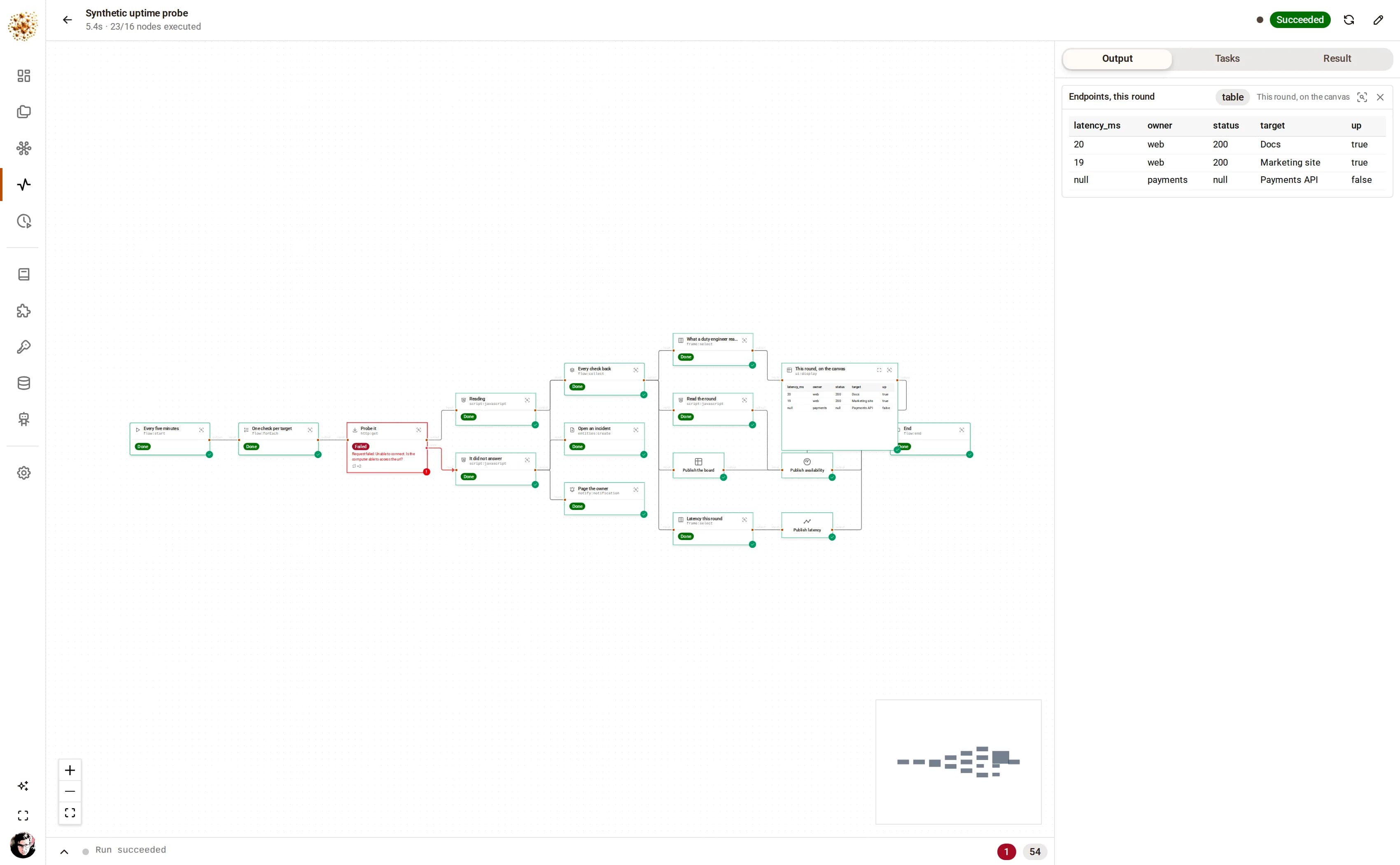
A finished DjiniousWorkflow run of a synthetic uptime probe: three parallel endpoint checks, one of them failed and red with its error message, the rest green, and the table the run published in the output pane.
A five-minute uptime check, one event per endpoint. Two answered; the third did not resolve, retried twice with backoff, and left by its error branch — which opened an incident and paged the owning team. The run still finished green, because that is what the graph says should happen to an endpoint that is down.
nodes ship, across 19 tools
330nodes ship, across 19 toolsplus the ones you build in the app
run state held in a process
0run state held in a processqueue · joins · waits · timers are rows
ways in without a browser
3ways in without a browserREST · MCP · Provider Interface v1
credentials sealed at rest
AES-256-GCMcredentials sealed at restno endpoint returns a secret’s value

What it is

One engine for the work that is too small for a service and too important for a spreadsheet

Most automation tools are a trigger, a list of steps and a log file. That is enough until the day a step fails halfway, a batch needs a person’s signature, or somebody asks what the number on the dashboard was actually computed from. DjiniousWorkflow is built around those three questions rather than around the happy path.

A graph, not a script

Fan a list out into one event per item, gather the results back, run two paths at once and join them, call another graph and wait for its answer. The structure is on the canvas, so the shape of the work is the first thing a new colleague sees.

branches · loops · joins · sub-workflows

330 nodes in the catalog

Flow control, data shaping, dataframe verbs, sandboxed JavaScript, HTTP and GraphQL, LLM prompts and agents, entity CRUD — and connectors: SQL and document databases, object stores and files, brokers, notifications, and a long tail of SaaS APIs.

19 tools · one file each

Runs you can watch

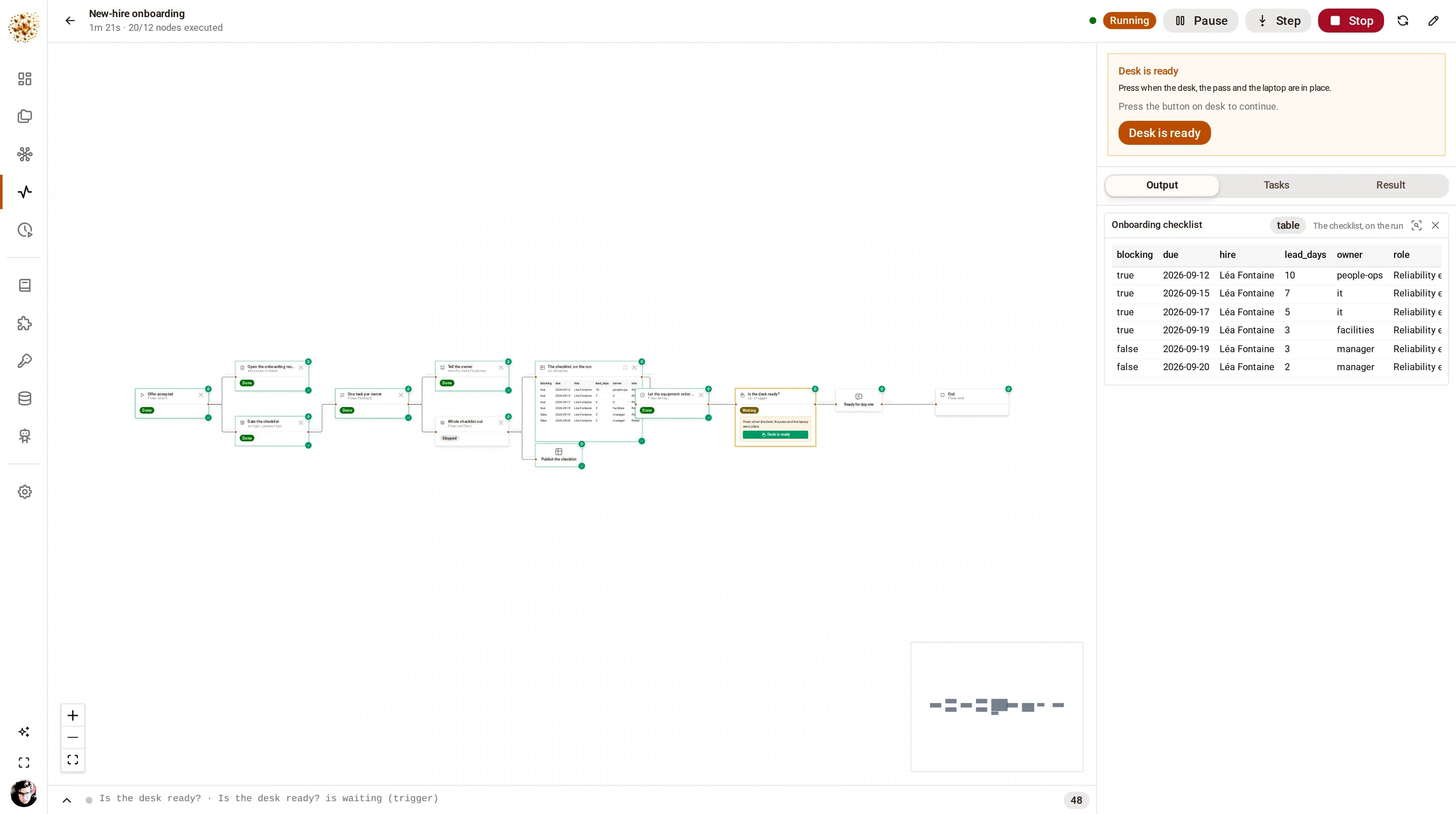
A run draws itself: each node shows its state on the canvas as it executes, the log explains what happened, and a node’s output opens full-page — sortable, filterable, chartable, exportable. Open a finished run a week later and the widgets are still there.

live, node by node

A person in the loop, properly

A graph can stop and wait for a decision. The pending approval is a row, not a held thread, so a run can sit on it for days across restarts and answer on whichever replica the person happens to reach. Rejection is a first-class path, not an error.

approvals are database rows

Pages a graph publishes

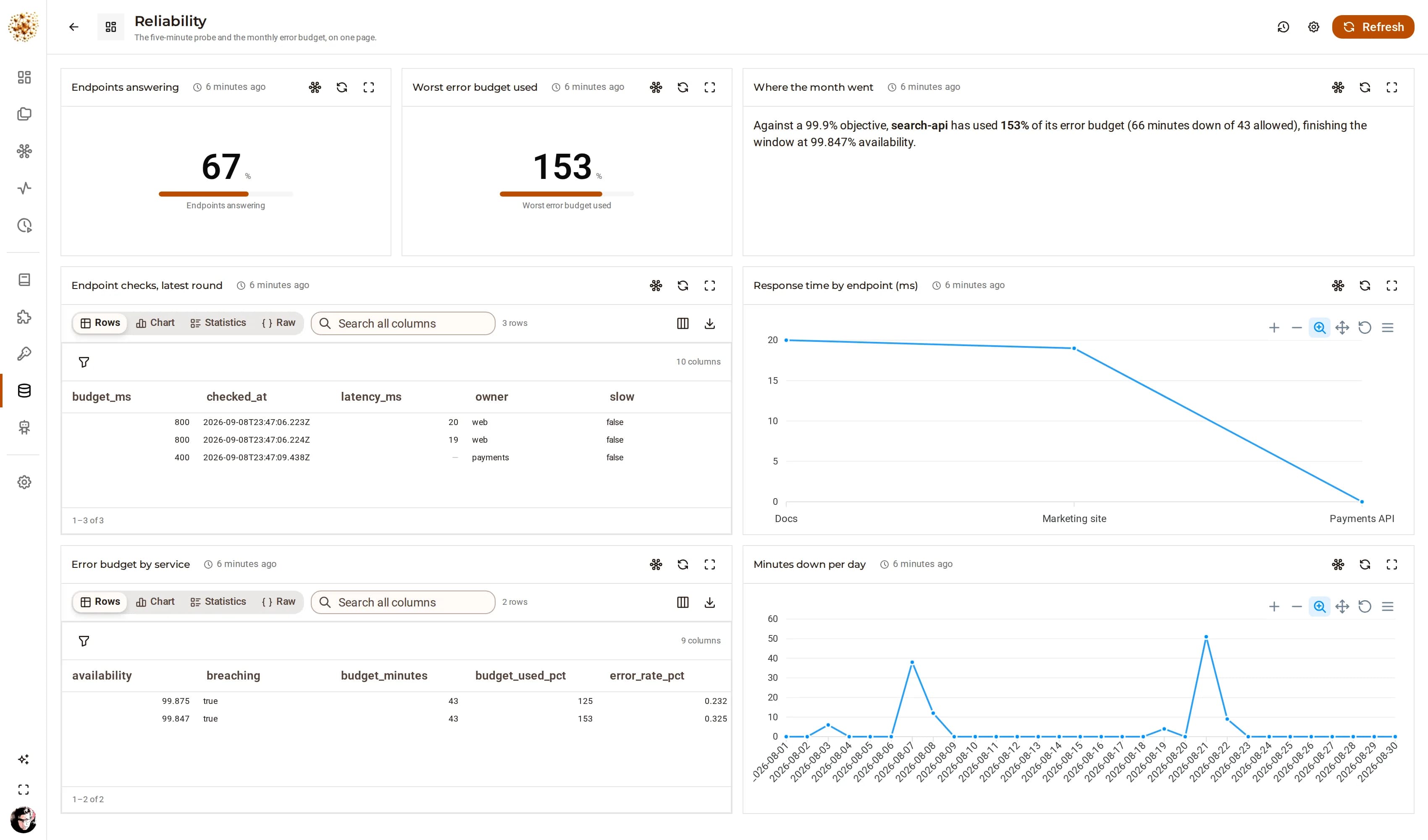
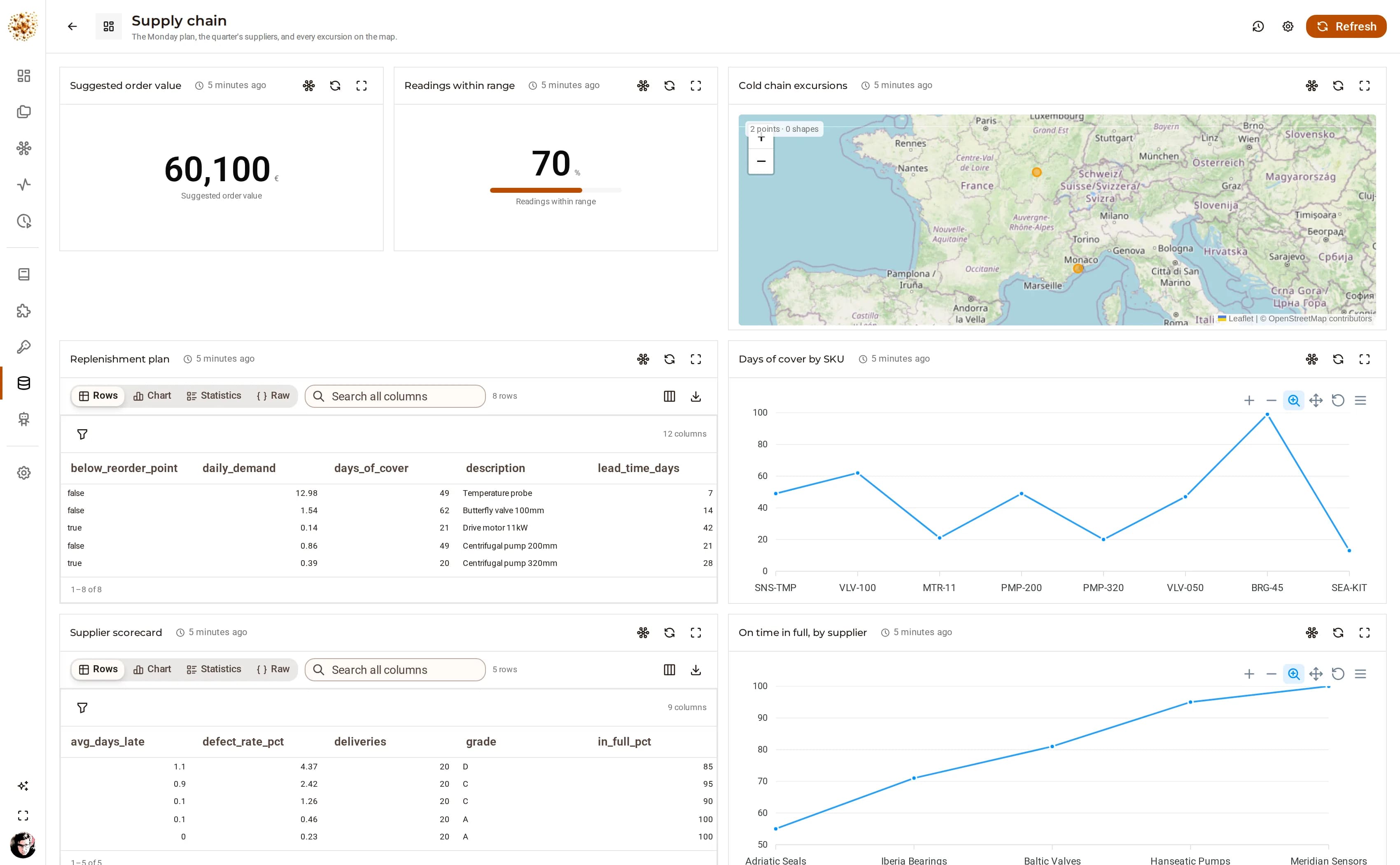
A views:* node writes into a saved page that outlives the run — a table, a chart, a metric, a map. Republishing replaces the data wherever the page has been arranged to put it, and every number on it traces back to a run you can open.

views · panels by key

Projects, artifacts and records

Graphs live in projects with the resources they share: data, documents, files and links. A run can write a record into your own ontology, file a spreadsheet in the object store, or leave a link — each stamped with the run that produced it.

where the output goes

Inside the product

See it working.

Every capture below is the running product.

01 · Build

Drag, wire, and set parameters that know what they are

Drag a node from the catalog, wire it, and set its parameters in the inspector. Every parameter accepts an expression, so a value can come from the payload, the run context, the loop counter or another node — and a node that needs a credential names one rather than holding it.

  • 330 nodes across 19 tools, searchable by name or category
  • Expressions everywhere: {{$input.total}}, {{$merged[1].id}}, {{$settings.region}}
  • A node you need but the catalog does not have is built in the app, not in a fork
  • Validation is live: the header says whether the graph is runnable, and why not
DjiniousWorkflow
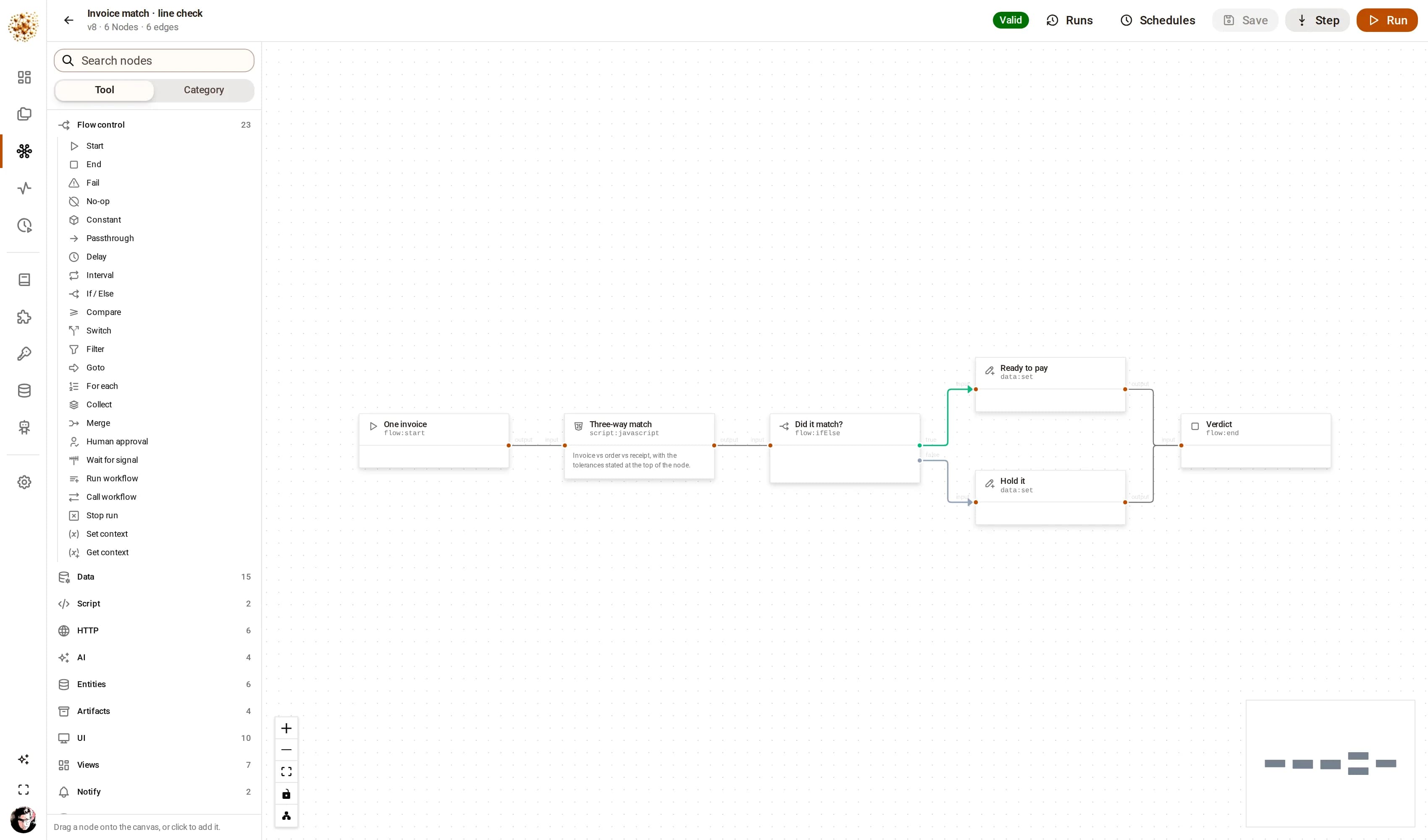
The DjiniousWorkflow canvas showing a six-node invoice matching graph: a start node, a three-way match script, an if/else branch, two data nodes for the two outcomes, and an end node.
One invoice against its purchase order and its goods receipt. Six nodes, one branch, and each node printing the function it calls under its name — which is what makes a graph readable by somebody who did not write it.

02 · Run

Every route ends in the same queue

Fire it by hand, on a cron schedule, from an inbound webhook, from the REST API, from another graph, or from an agent over MCP. Every route ends in the same queue, and every run records which one it was.

  • Cron schedules with a timezone, claimed so exactly one replica fires each occurrence
  • Inbound webhooks with a per-trigger token
  • One graph can call another and wait for its result — decomposition, not duplication
  • Retries with exponential backoff, and an error branch when the retries are spent
DjiniousWorkflow
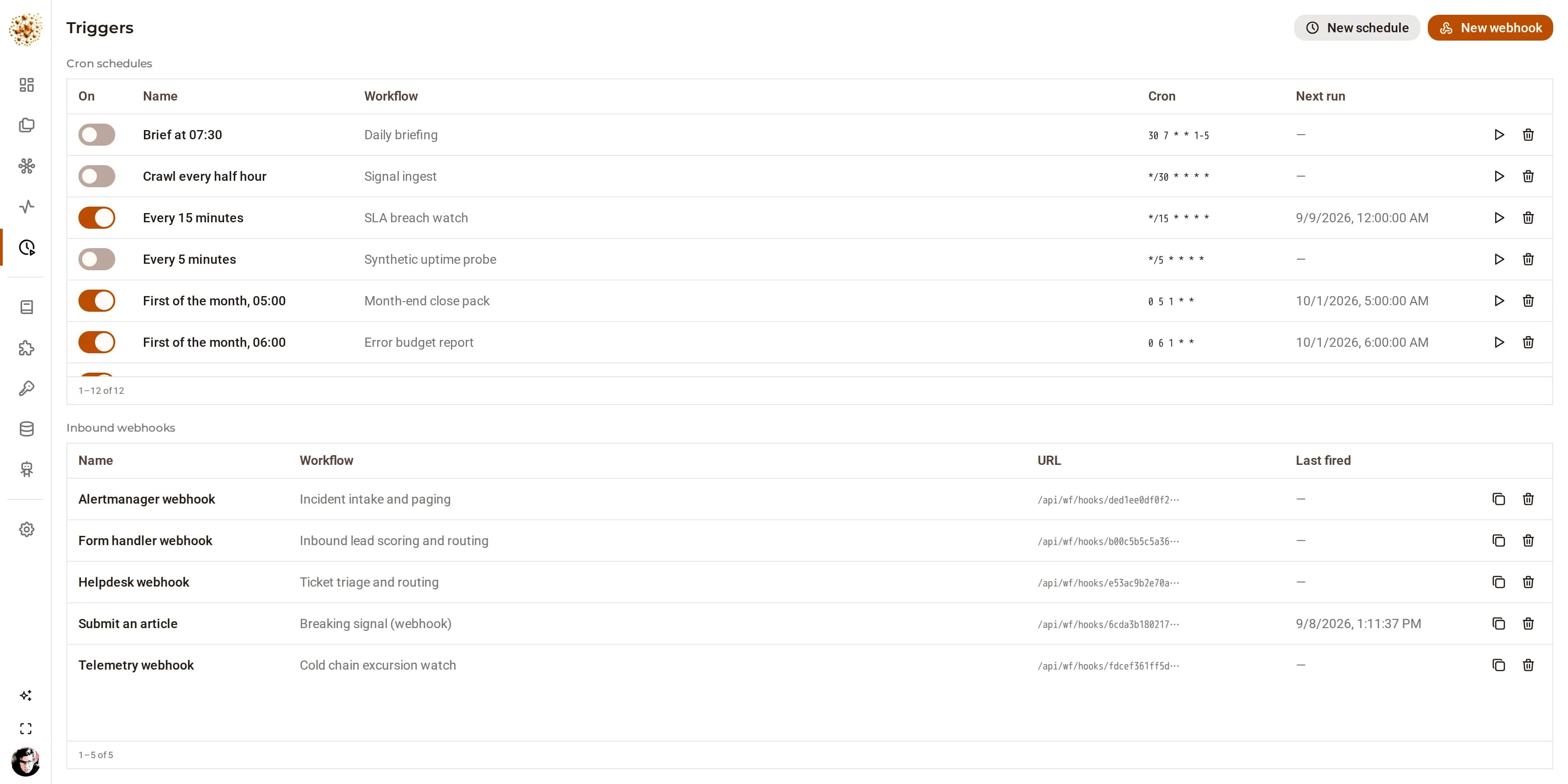
The DjiniousWorkflow schedules page listing cron schedules for the showcase graphs with their next run times.
Schedules are rows with a next-run time, claimed atomically. Two replicas racing for the same occurrence is the normal case, and exactly one of them wins it.

03 · Watch

The canvas, with the truth painted on it

The run monitor draws the graph as it executes: a spinner while a node works, a check with its repetition count, a red mark carrying the failure message. Nodes that publish a widget draw it in place, and the log dock explains the rest. The run monitor and the editor are the same component with a different question in front of it: an operator watching a failure and an author fixing it should be looking at the same picture.

  • Live over a websocket, and polled as well — the socket is a latency optimisation, never the source of truth
  • Pause, step, stop, or fire a single node by hand while the run is live
  • Widgets replay when you open a finished run: the log carries them, not just the socket
  • An approval waiting on a person appears in the rail, with the payload it is asking about
DjiniousWorkflow
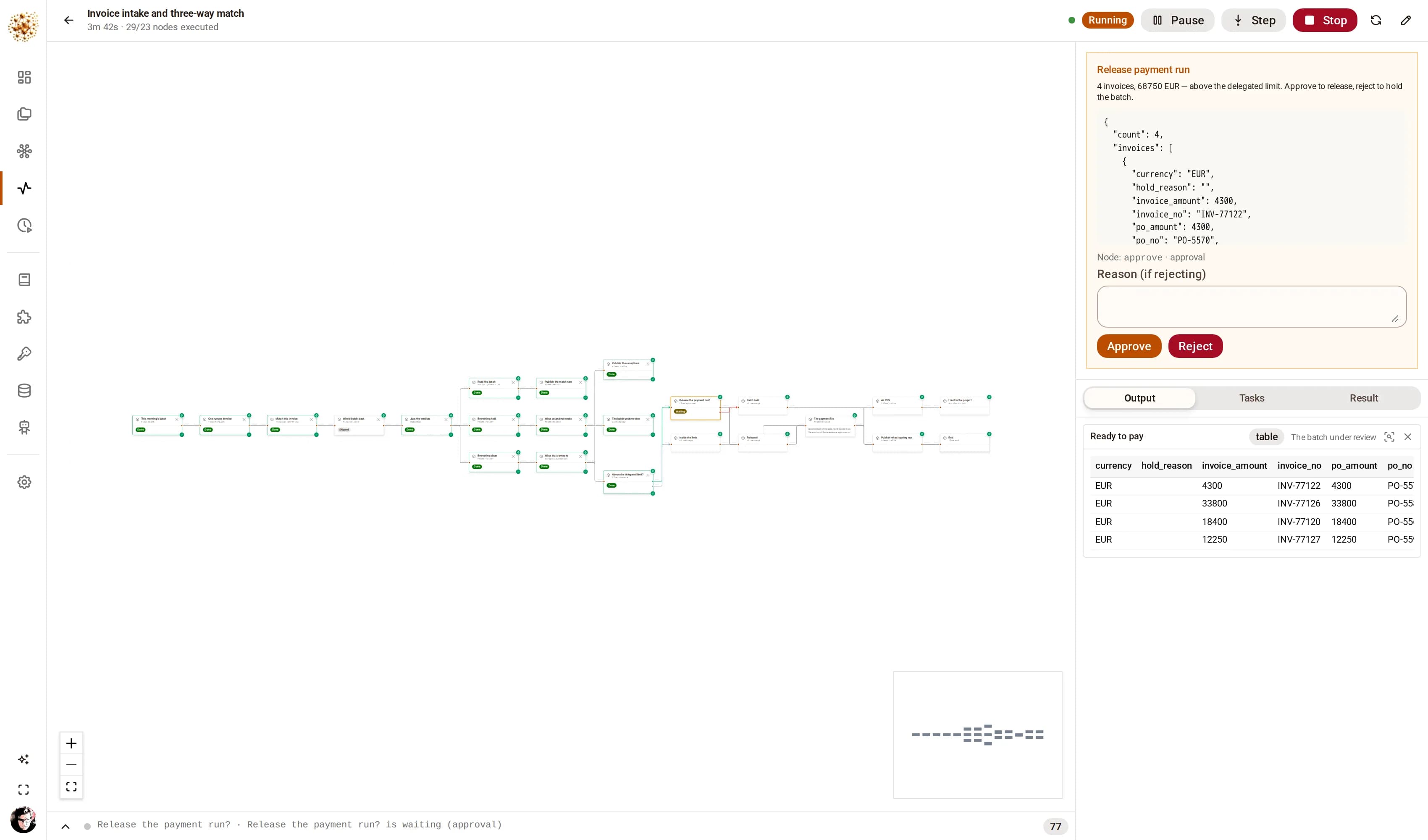
A DjiniousWorkflow run parked on a human approval: the rail shows the batch being released, an Approve and a Reject button, and a box for a rejection reason.
A payment run above the delegated limit, stopped in front of a person. The rail carries the batch it is asking about; the run has been suspended in the database, so it costs nothing while it waits and survives a restart of every replica.

04 · Publish

Leave something behind

A graph that only logs is a graph nobody reads. These publish: a page of panels, a record in your own ontology, a file in the project, a notification, a webhook out. Each one is addressed by name, so the next run replaces it rather than piling up beside it.

  • Views: tables, charts, metrics, markdown and maps, arranged by whoever reads them
  • Entities: records in the ontology you defined, stamped with the run that wrote them
  • Artifacts: values, documents and real files — bytes go to object storage, small payloads stay in the database
  • Notifications in-app, and outbound webhooks for everything else
DjiniousWorkflow
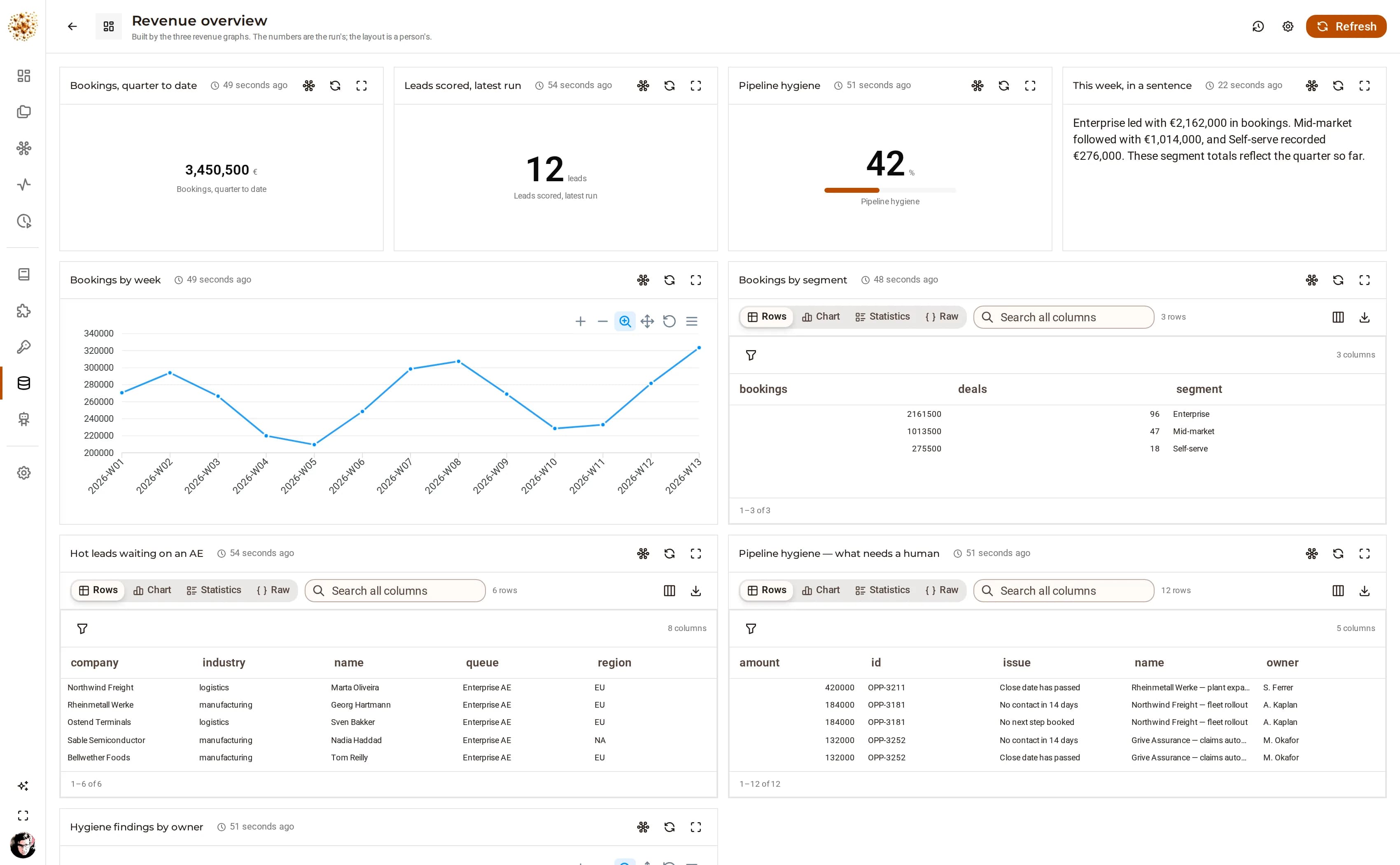
The Revenue overview page in DjiniousWorkflow: a quarter-to-date metric, a leads-scored metric, a pipeline hygiene gauge, a written commentary, a bookings-by-week chart and two tables.
One page, three graphs. The metrics come from the nightly sweep, the chart and the tables from the Monday review, and the paragraph at the top is the model reading the numbers the graph computed — never producing them.

05 · The explorer

Any payload, full page

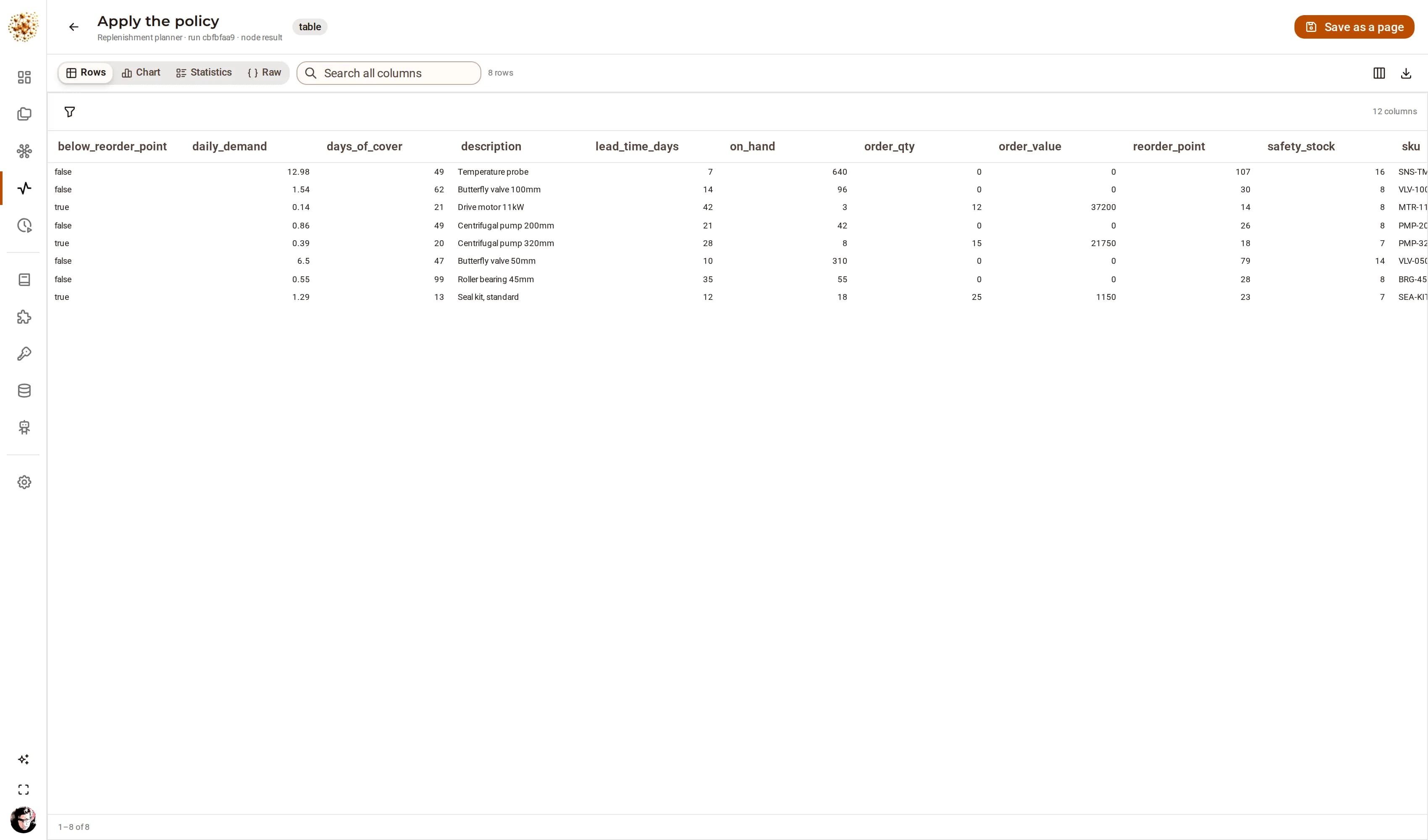
The glance you take while a run is going is not the look you take when the glance raised a question. Any node’s output opens full-page — sortable, filterable by column, searchable, chartable, profileable, exportable to CSV — and it works on the plain sql:query node nobody decorated, because it reads the task’s own result when there is no published widget.

  • Rows, chart, statistics and raw JSON of the same payload, one click apart
  • Column picking, per-column filters, paging and search over everything
  • Save the configuration — the sort, the filters, the hidden columns, the chart — onto a page
  • What is saved is the configuration, never the data: the new page is as fresh as its graph’s last run
DjiniousWorkflow
A DjiniousWorkflow node output opened full-page: the replenishment plan as a sortable, filterable table with column controls, statistics and chart tabs, and a CSV export.
The replenishment planner’s output, opened from the run that produced it. Nothing was configured to make this work: the explorer reads the task’s own result.

06 · The node builder

The node you need, without a fork

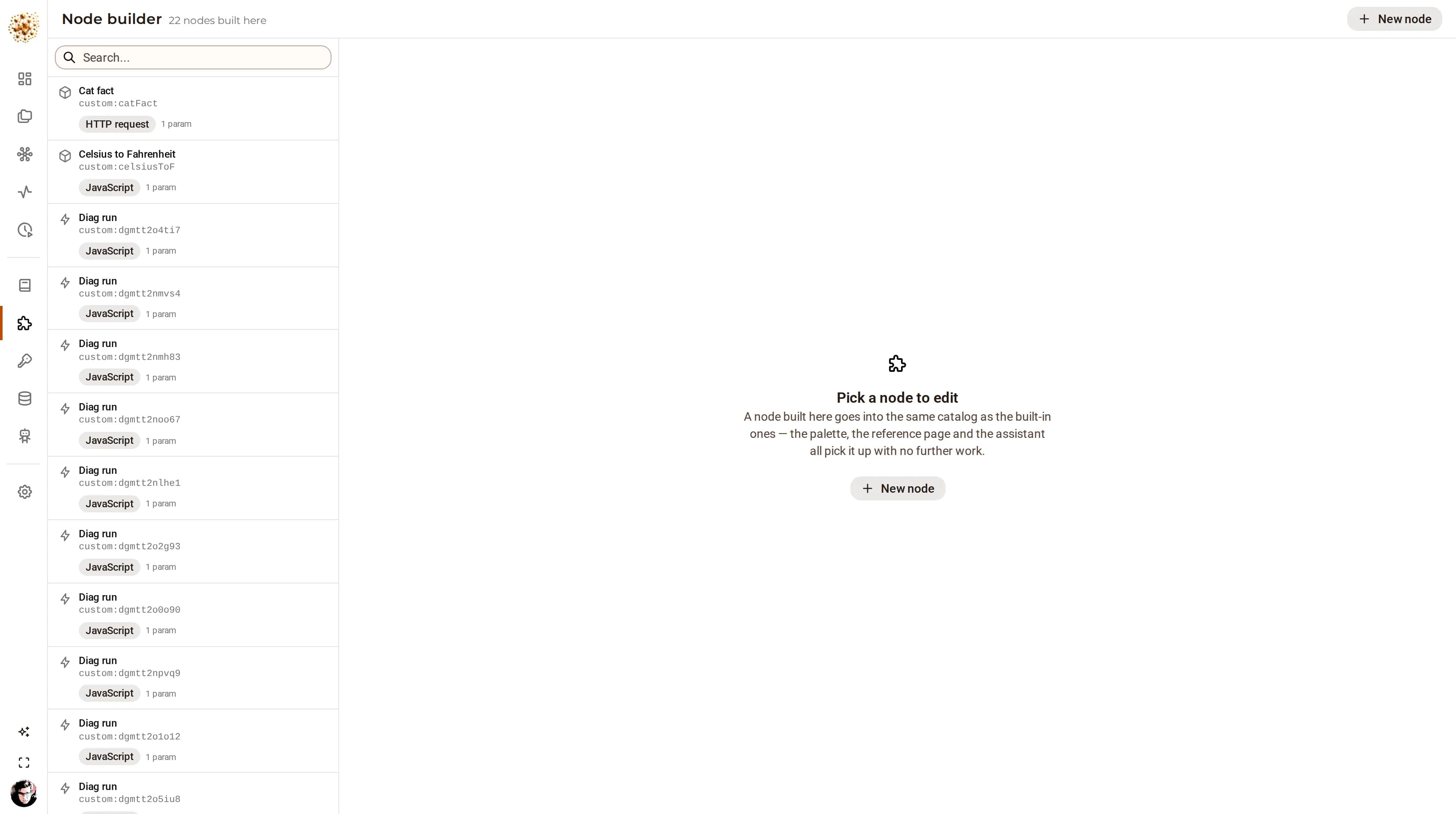
Some of what a deployment automates is specific to that deployment: an internal REST service, a GraphQL endpoint behind your VPN, one SQL statement everybody keeps rewriting. Building those into a product would be wrong, and asking for a pull request to get them is worse. So the app builds them: describe the call, name its parameters, test it against the real endpoint, and it lands in the catalog.

  • HTTP, GraphQL, SQL, a script, or another graph wrapped as one step
  • Parameters you declare, with the same typed controls the built-in nodes get
  • Test it before saving, against the credential it will use in production
  • The palette, the reference page, the MCP tool list and the assistant pick it up immediately
DjiniousWorkflow
The DjiniousWorkflow node builder: a form describing a node’s kind, its parameters and its request, with a panel for testing it against the real endpoint before saving.
Describe the call, declare its parameters, test it against the endpoint it will use in production, and it is in the catalog — palette, reference page, MCP tool list and assistant included.

AI & agents

Use a model where a model is right. Keep the rules where you can read them.

A language model is very good at reading prose and poor at being audited. So in this product it reads the ticket, drafts the sentence, or explains the table — and the queue, the threshold, the tolerance and the approval stay in nodes a colleague can open and change. Both halves are on the same canvas, which is what makes the split visible instead of theoretical.

01

Four nodes, not a mode

ai:prompt returns text. ai:extract returns JSON matching a schema you wrote, and retries once with the parse error fed back. ai:classify returns exactly one of your labels. ai:agent runs a tool-calling loop with a mission, an allow-list and a step ceiling. Each is a node like any other — timeout, retry policy, error branch.

02

The model never produces the number

In the graphs that ship with the product, the totals, the variances and the scores are computed by nodes. The model is handed the result and asked to write the sentence beside it. When a figure and a paragraph disagree, you can tell which one was measured — and the paragraph is the one that changes.

03

Every AI node has a way to fail

The showcase’s classifier falls back to a keyword rule set; its commentary node falls back to a plainly-worded sentence and the page is still built. An automation that stops when an inference endpoint has a bad afternoon is not an automation you put in front of customers, and the graph is where that decision belongs.

04

Your endpoint, your data

Point it at a vendor or at a model you run. Anything OpenAI-compatible works, which includes vLLM, SGLang, LM Studio and llama.cpp on your own hardware — so a deployment that cannot send text to a third party can still use every AI node.

05

An assistant that builds graphs, over the API you already have

The in-app assistant is a tool-calling agent with the platform’s own surface in front of it: list the catalog, author a workflow, run it, read its logs, query entities, resolve an approval. It is a client of the same REST API you are, under the same role checks — and its tool calls are visible as they happen, arguments and results included: a trace, not a summary.

06

Agents outside the app, over MCP

A coding assistant, a scheduled analyst or your own tooling can list the catalog, create a workflow, run it, watch it, read the logs and answer an approval. The tool list is generated from the same catalog the palette reads, so a node built in this deployment appears in the agent’s tool list immediately — an agent’s abilities and a person’s stay in step by construction.

DjiniousWorkflow
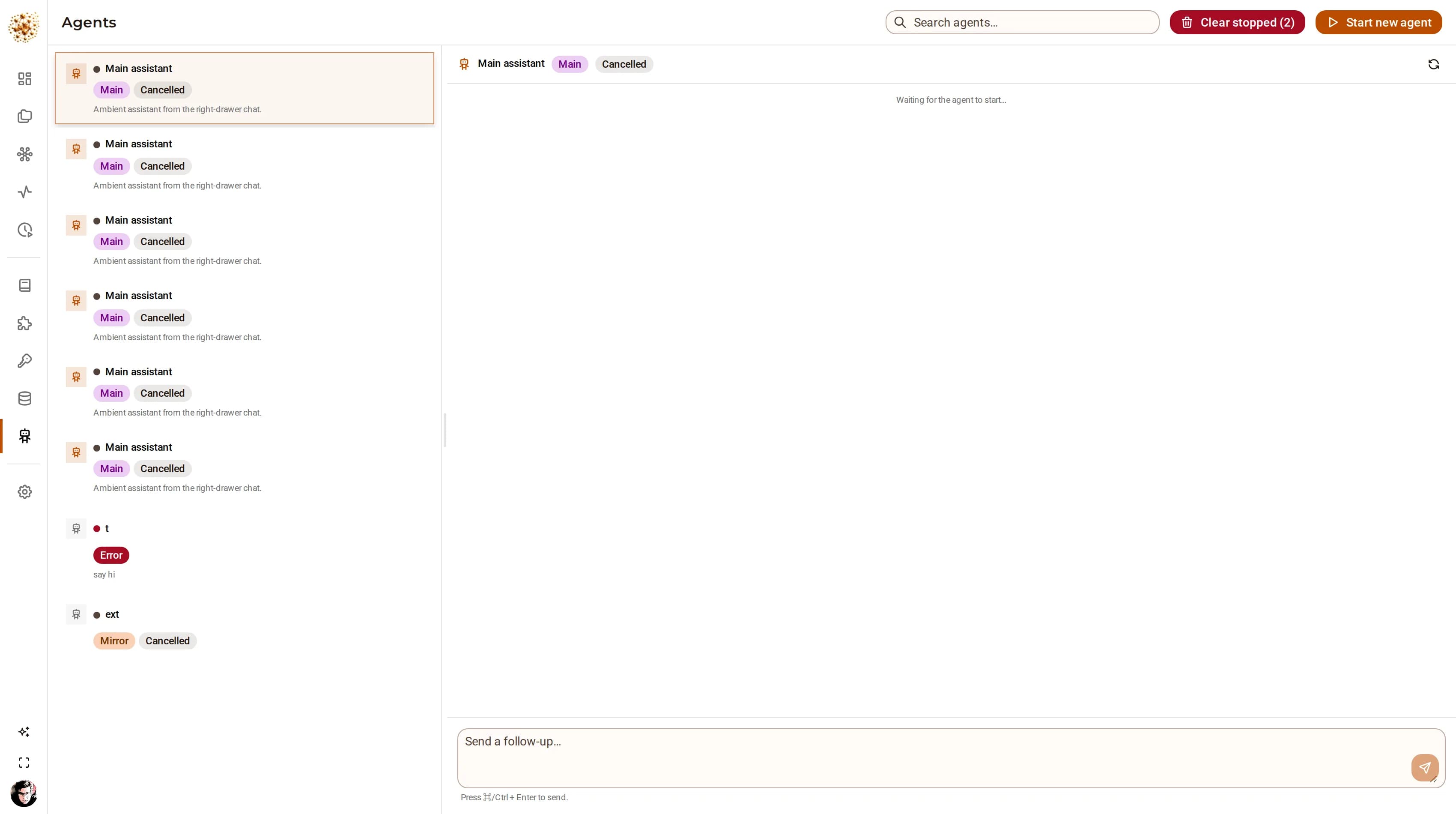
The DjiniousWorkflow agents page listing saved agent definitions with their mission, allowed tools and step limits.
An agent definition is a record, not a prompt buried in a node. Change the mission once and every graph that references it by name runs the new one.

Capabilities

The whole surface, part by part

DjiniousWorkflow is one Bun API over SurrealDB with a React client on top: an engine, a node catalog, a place for the graphs to live, and three ways in that do not involve a browser — what builds, what fires, what executes, what a graph reaches, and what it leaves behind.

Authoring4 capabilities

The graph is the document

A workflow is a set of tasks, each calling one function from the catalog, with the edges living in the nodes’ own inputs and outputs. That makes a graph one self-contained document you can export, diff in a pull request, and import somewhere else — not a database of rows that only mean something inside one installation.

330 nodes, 19 tools

Flow control (23), data shaping (15), dataframe verbs (20), transforms (19), sandboxed JavaScript (2), HTTP (6), AI (4), entity CRUD (6), artifacts (4), run widgets (10), pages (7), notifications (2) — and the connectors: SQL (40), document and key-value stores (25), analytics and search (22), brokers (11), files and object storage (30), push and mail (37), SaaS APIs (47).

Parameters that know what they are

A parameter declares its type, its help text, whether it is required, and when it is even relevant — an HTTP node hides the body on a GET. A credential parameter offers the credentials of that kind and nothing else. Every parameter also accepts an expression, so a value can come from the payload, the run context or the loop counter.

Validation while you build

The header says whether the graph is runnable and, when it is not, which node and which edge is the problem. A draft is allowed to be incomplete — you save as you build — but a run refuses an invalid definition rather than discovering it three nodes in.

Triggering4 capabilities

Cron schedules

A schedule is a row with a cron expression, an optional timezone and a next-run time. Occurrences are claimed atomically, so with four replicas running exactly one of them fires each occurrence — the ordinary case, not a race to be avoided.

Inbound webhooks

A trigger mints its own token and answers at its own URL. The body becomes the run’s input, and the trigger can name the task to enter, so one graph can serve several sources without a router node in front of it.

Run from anywhere

A single call starts a run; scoped API tokens (djwf_…) mean a script or a CI job can do it without a user session. A graph can also start another — fire-and-forget, or call-and-wait for its result.

Human-driven, deliberately

Some runs should start when a person presses a button, and a run can also park mid-flight on a ui:trigger node and continue when somebody presses one on the canvas. The wait is a row like any other, so the press can land on any replica.

Execution4 capabilities

A stateless engine

Every piece of run state — the queue of what to do next, a join’s partial arrivals, a suspended approval, a repeating timer — is a row in the database. A process contributes a worker loop and nothing else, so scaling out is running more replicas and a node that dies has its work picked up by the others.

Fan-out and gather

For each turns an array into one event per item, and Collect accumulates them back. Each arrival is its own row rather than an append to a shared array, which is what keeps a forty-way fan-out from contending with itself, and what lets a gather survive the worker that started it.

Retries, and then a branch

A node can retry with exponential backoff. When the attempts are spent the payload leaves by the error branch — carrying the failure message and the payload that failed — so the graph handles it instead of the run dying. With no error branch wired, the workflow’s own setting decides between failing the run and letting the other branches finish.

Long waits cost nothing

An approval, an inbound signal, a delay of six hours, an interval that fires every ten minutes: none of them occupies a worker. They are rows with a time or a status on them, which is why a run can sit on a decision for days across restarts.

What a graph reaches4 capabilities

Databases and stores

PostgreSQL, MySQL, MariaDB, SQLite, CockroachDB, Timescale, QuestDB, Supabase, Redshift, Yugabyte; MongoDB, CouchDB, Redis and friends; ClickHouse, Elasticsearch, OpenSearch, Meilisearch, Typesense, Qdrant, InfluxDB, Prometheus, BigQuery. Query, select, insert, upsert, update, delete, transaction — plus the introspection nodes that list and describe tables.

Files, objects and brokers

CSV, XML, YAML, JSONL, Excel and ZIP as pure format nodes with no network at all; S3, FTP and SFTP as location nodes that move bytes; Kafka, RabbitMQ, MQTT and NATS for the queues. Consume nodes are bounded and say so.

Credentials, sealed

A connector node names a credential; the credential holds the value, sealed with AES-256-GCM, and no endpoint returns it. The same graph runs against staging and production by pointing at a different credential of the same name.

A node the catalog does not have

Build it in the app: an HTTP call, a GraphQL query, a SQL statement, a script, or another graph wrapped as a single step. It lands in the same catalog as the built-ins, so the palette, the reference page, the MCP tool list and the assistant all pick it up immediately — with no fork and no deploy.

What it leaves behind4 capabilities

Pages

A views:* node writes a table, a chart, a metric, some markdown or a map into a saved page. Panels are addressed by key, so republishing replaces the data wherever the page has been arranged to put it and keeps the title and size a person chose. A workflow is the only writer of panel data — the REST surface enforces it.

Records

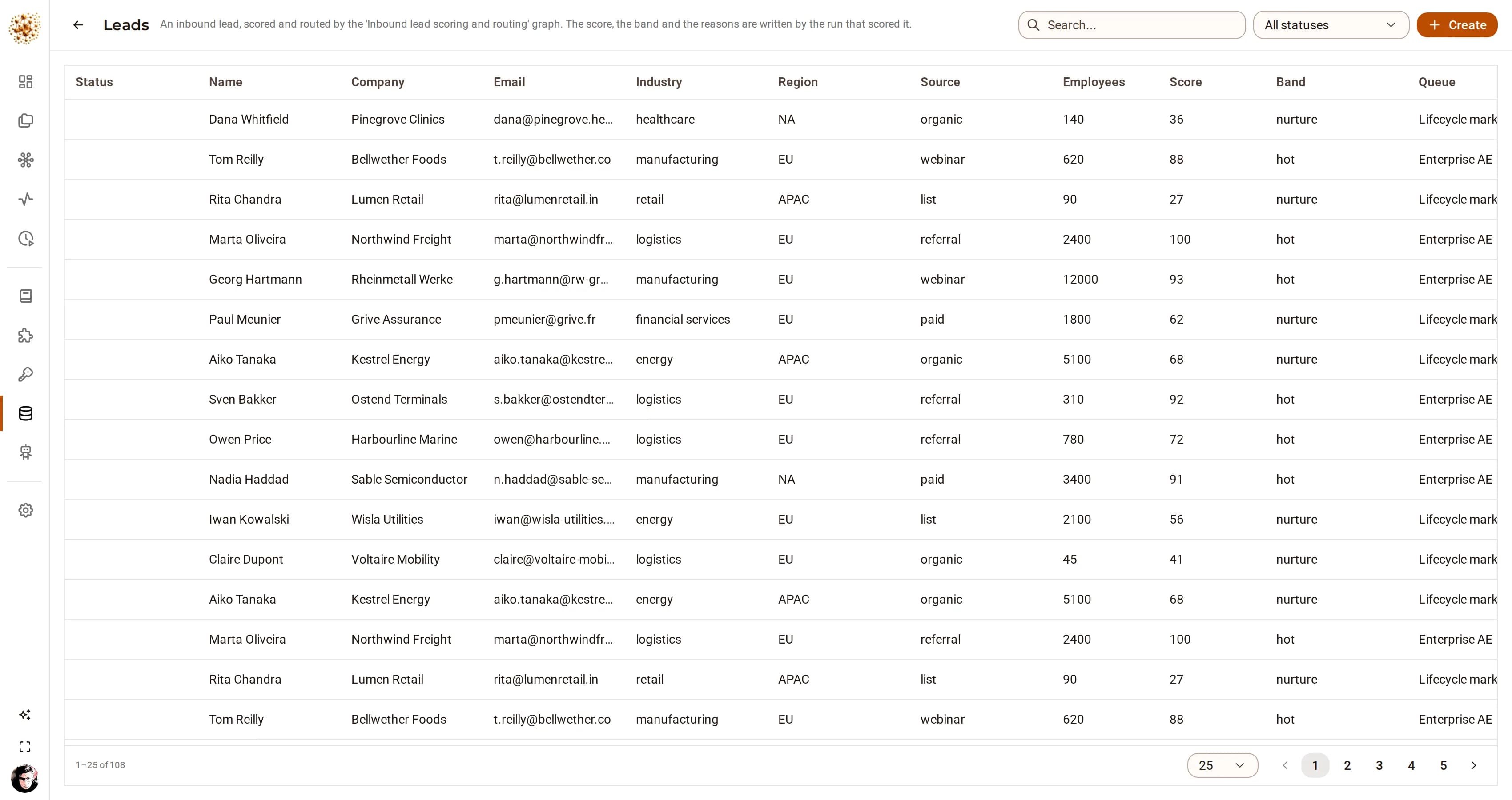
Entity types are defined at runtime — fields, a status machine, an icon — and a graph writes records into them. Every record carries the id of the run that produced it, so a figure on a page traces back to the execution that computed it.

Files and resources

A project holds artifacts: data, documents, images, video and links. Where the bytes go is the platform’s decision, not the caller’s — small payloads stay in the database, real files go to the S3-compatible object store, and a URL is stored as a reference rather than a copy.

Out of the building

In-app notifications, outbound webhooks, email over SMTP, and the push and messaging connectors for everything else. A graph that finishes quietly is a graph nobody trusts twice.

Where the work lives3 capabilities

A project is a workspace

Graphs live in a project with the resources they share, and a graph reaches its project’s resources by name — so the same graph cloned into another project reads that project’s copy of ‘the source list’. Every workflow belongs to exactly one project; there is no unfiled state to tidy up later.

An ontology you define at runtime

Entity types are configured, not coded: fields with types, a status machine with its transitions, an icon and a colour. A graph writes records into them, and the record carries the run that wrote it — which is how a figure on a dashboard is traced back to an execution.

Import, export, diff

A workflow exports as one JSON document and imports into another deployment. That is what makes a graph reviewable in a pull request, and what makes ‘promote this from staging’ a file rather than a migration.

Being driven4 capabilities

The REST API is the product

Everything the UI does is an API call, and the UI is one client among several. Scoped tokens (djwf_…) let a script, a CI job or another service author, run and inspect a workflow without a user session.

MCP, in the same process

An MCP server answers in the same process: list the catalog, create a workflow, run it, read its logs, resolve an approval, query entities. An agent with that endpoint can build and operate automation without a browser — and the tools it sees are generated from the same catalog the palette reads.

Provider Interface v1

The platform contract other Djinious apps and djinious-atoms drive this one through: a versioned operation registry, a /capabilities document, and an OpenAPI snapshot committed to the repo with a unit test that fails on drift — because a consumer’s CI is written against that file.

Roles that mean something

Admin, user and viewer. A viewer sees workflows, runs and logs and can change none of them — including that a custom node exists without seeing its implementation, and never a credential’s value. The checks live next to the route handlers, not only in the UI.

Trust

A worker holds no state. That is the whole design.

The queue of what to do next, a join’s partial arrivals, a suspended approval, a repeating timer — every one of them is a row in the database. A process contributes a worker loop and nothing else. Everything here follows from that, including the parts that are inconvenient — so the limits are stated too.

Events are leased, not held

A worker claims an event with a lease. If it finishes, the event is completed and its consequences are queued before the claim is released — so there is never a moment where the queue looks empty while work is still in flight. If the worker dies, the lease expires and another worker picks the event up. Delivery is at-least-once, and the engine says so plainly rather than implying exactly-once.

claim · lease · reclaim

A gather’s arrivals are rows

The obvious implementation of a fan-in appends to an array on one record. That record becomes a contention point, and under a forty-way fan-out the losers of each write conflict lose their items silently. Here each arrival is its own row at its own id, and completion is claimed by taking the rows: exactly one worker gets them, the rest stand down.

one row per arrival, never an array

A join completes once, on whichever node

Branches of a join arrive on different workers at the same instant, by design. The arrival that completes it is decided by a conditional claim rather than by a read-and-check, because a read-and-check is the same race one layer up. This is where the engine has been wrong before, and both bugs are pinned by tests that run ten branches finishing together, five times over.

count, then claim

Waiting costs nothing

An approval, an inbound signal, a delay, an interval: each is a row with a status or a time on it. No worker is parked, no thread is held, no memory is pinned. A run can wait days for a person and survive every replica restarting in the meantime — and the answer can land on whichever replica the person happens to reach.

wf_wait · wf_timer

Scaling out is running more of them

Every replica runs the same loop against the same database. There is no coordinator to elect and no shard to assign: they compete for events, and the claim decides. A schedule’s occurrence is claimed the same way, so four replicas do not mean four runs at 07:00.

shared queue, no leader

Secrets are not in the graph

A connector node names a credential; the credential holds the value, sealed, and no endpoint returns it — not to the UI, not to the API, not to an agent. That is what lets the same graph be exported, reviewed in a pull request and imported into another deployment without a secret travelling with it.

AES-256-GCM at rest

Every run is a document, and it stays one

A run keeps the graph as it was when it started, its per-task status, repetition count, last result and error, its event ledger, and its log with the published widgets replayed into it. Records a graph wrote carry the run id, and artifacts carry the run that filed them — so the figure on a published page is traceable to the execution that produced it.

the run record

Roles and tokens

Roles are checked next to the route handlers, mirrored in the UI, never only in the UI. Scoped djwf_ tokens for scripts, CI and agents are minted and revoked per consumer, and an allow-list (WORKFLOW_HTTP_ALLOWLIST) bounds where a graph may call, when you want one.

admin · user · viewer · djwf_

Limit: at-least-once delivery

A node that dies between doing its work and recording it will run again. Idempotency is therefore the author’s job where it matters, and the catalog’s connector nodes are written to make it easy — upserts rather than inserts, named artifacts rather than appended ones.

stated, not hidden

Limit: the database is the floor

Throughput is bounded by SurrealDB, because every event, arrival, wait and timer is a write. That is a deliberate trade: the failure modes it removes are worth more than the ceiling it imposes for the work this engine is for. It is not the right engine for a million events a second.

stated, not hidden

Limit: sandboxed, not isolated

A JavaScript node runs in a Bun worker with a timeout, which contains a mistake and an infinite loop. It is not a security boundary against a hostile author, and the deployment’s own controls — who may write a graph — are what stand in that place. Local file nodes are confined to a configured root, and disabled rather than unrestricted when that root is unset.

stated, not hidden

In the digital thread

What it takes in. What it hands on.

DjiniousWorkflow does its part of the engineering loop and passes its evidence along — and it works just as well on its own.

DjiniousWorkflowAgent automation
On its own

On its own it is a complete automation engine: 330 nodes reaching databases, brokers, files, SaaS APIs and models, with its run state, approvals and schedules in its own database. Six departmental showcase projects ship with it and run without any other Djinious application.

Book a demo

See it on your problem.

Ninety minutes against your own work, not a scripted tour. We build it in front of you, run it, and break a node on purpose — because how a graph fails is the part you are actually buying.

  1. Take a process you run by hand today — the one with the spreadsheet, the approval and the person who chases it
  2. Build it on the canvas while you watch, with the nodes that read your own systems
  3. Run it, and open the run: every node, what it produced, how long it took
  4. Break a node on purpose and show you what the graph does about it — retries, then the error branch
  5. Park it on an approval, close the browser, reopen it, and answer the approval
  6. Leave you the page it published, and the graph as a file you can keep