 Djinious
Real parts, simulation-ready
Every component carries its full record — specification, interfaces, manufacturing source and unit cost, compliance flags — and a functional model. Pick a motor; you also picked its dynamics.
Components libraryThe platform
Each application does one part of the work — and hands its evidence to the next. Use them together, or one at a time.
Platform overviewSee how the loop runs DjiniousEngineeringOrchestration
 DjiniousLabModelling & simulation
 DjiniousWorkshopSystem integration
 DjiniousSafeCertifiable code
 DjiniousWorld3D replicas
 DjiniousMapAgent GIS
 DjiniousCCOperations & SCADA
 DjiniousDataKnowledge base
 DjiniousWorkflowAgent automation
 DjiniousWorkshopSystem integration
DjiniousWorkshop runs your device as a system of functional models — motors, ESCs, battery, flight controller — and closes the loop through NVIDIA Isaac Sim rigid-body physics on the GPU.
 DjiniousWorkshop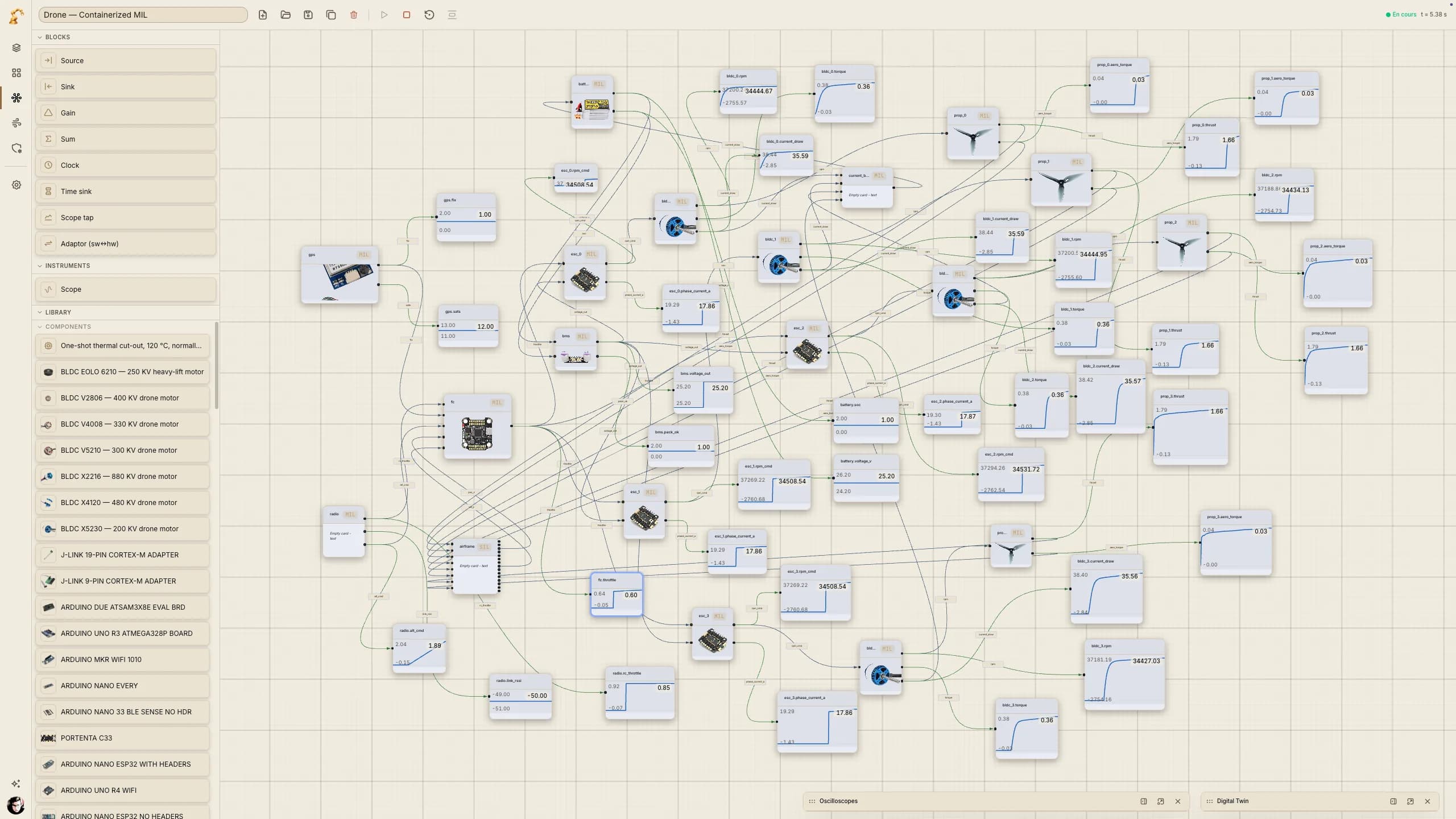
What it is
Design tools stop at the drawing; physical truth starts after you build. Requirements live in documents, components in spreadsheets, simulation in a separate silo, and real dynamics only appear on the bench. DjiniousWorkshop closes that loop: the part you pick, the system you wire and the physics that validate it are the same record end to end.
Every component carries its full record — specification, interfaces, manufacturing source and unit cost, compliance flags — and a functional model. Pick a motor; you also picked its dynamics.
Components libraryWire the parts into a co-simulation on the canvas — radio, flight controller, ESCs, motors, propellers, battery, airframe — each block a real functional model exchanging real signals.
System canvasPer-rotor thrust and torque from the functional models drive a 6-DOF PhysX rigid body on the GPU; pose, IMU and GPS stream back into the running system.
NVIDIA Isaac SimEach functional block runs as its own container on Docker Swarm. Model-, software- and hardware-in-the-loop are the same run with a different image — swappable on a live run.
MIL · SIL · HILA gated end-to-end suite runs the airframe bridge against Isaac Sim — reachability, a level hover and agreement with a deterministic analytic model — before it ships.
RUN_ISAAC_E2EBill of materials, interfaces, costs and manufacturing data are already attached to every part — the same model that flew in simulation becomes the package that goes to production.
BOM · PBSInside the product
Every capture below is the running product.
01 · Compose
Radio, flight controller, ESCs, motors, propellers, battery and airframe — each block a real functional model, wired into one co-simulation on the canvas. Wire it and the co-simulation runs live: real signals, not stand-ins.
DjiniousWorkshop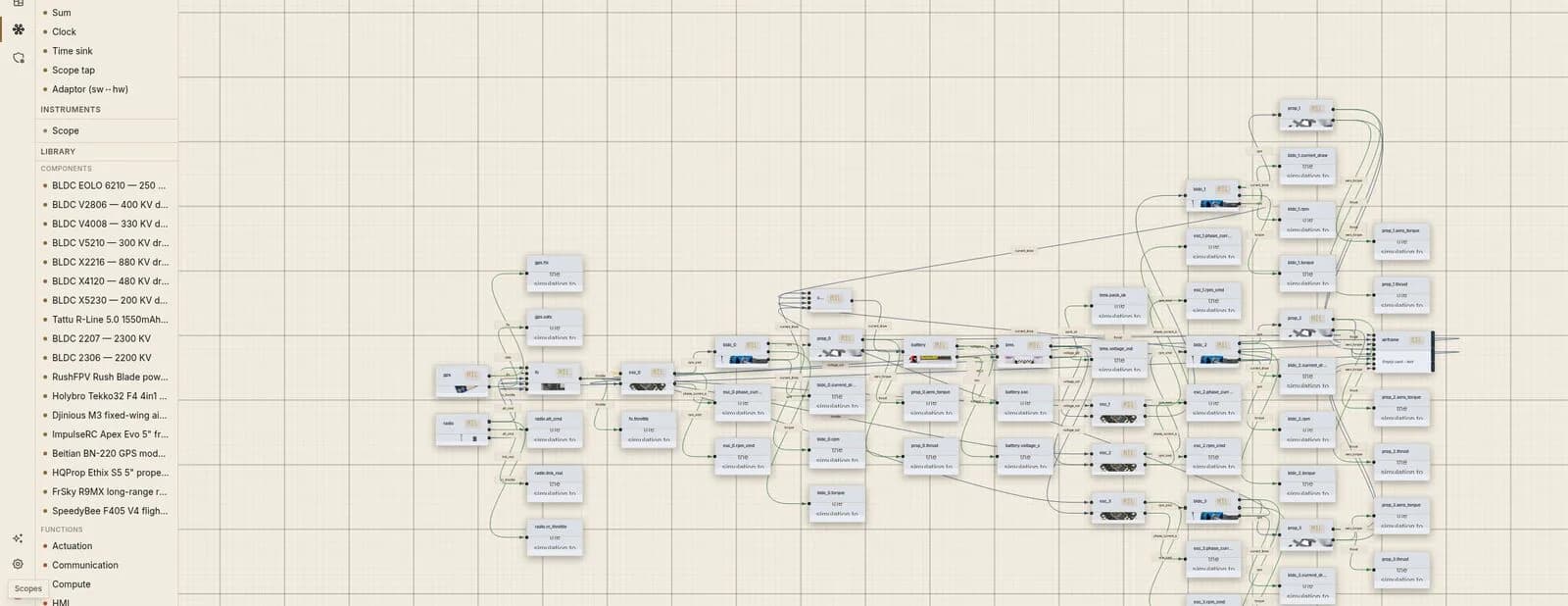
02 · Physics-in-the-loop
The airframe block hands off to NVIDIA Isaac Sim: per-rotor thrust and torque from the functional models drive a 6-DOF PhysX rigid body, and pose, IMU and GPS stream straight back into the running system — scopes, 3D twin and all.
DjiniousWorkshop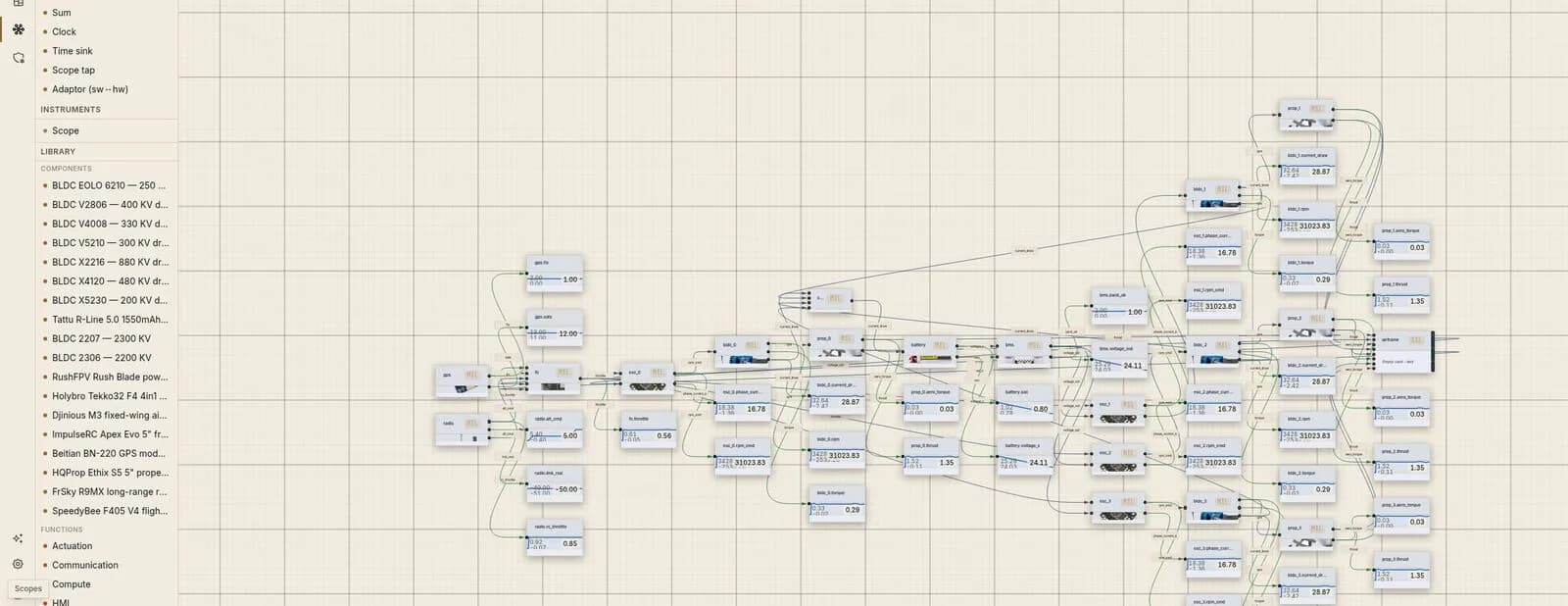
03 · Digital twin
Live scopes read airframe position and rate signals streamed back from Isaac Sim. Over the hover window, Isaac’s PhysX altitude tracks a deterministic 6-DOF analytic model to within half a metre — the GPU simulation and first principles agree. The recorded mission is a real take-off, hover and landing computed by the same functional models and Isaac Sim physics.
DjiniousWorkshop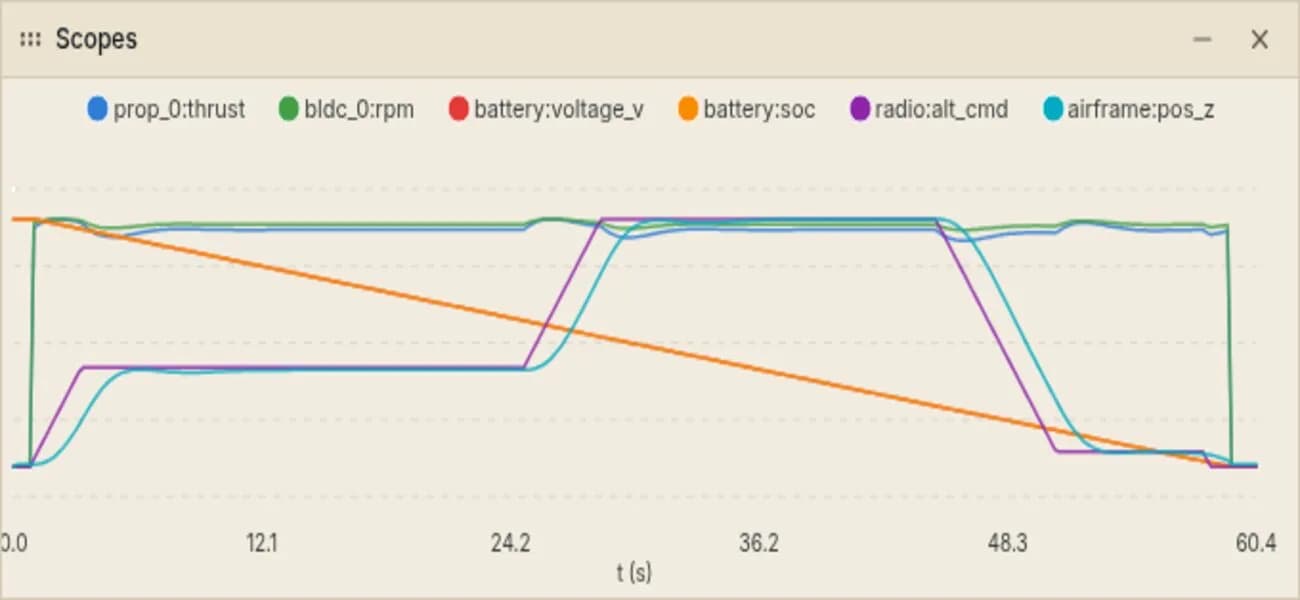
04 · Under the hood
The airframe block speaks one small protocol to whatever is computing rigid-body physics underneath it — ping, connect, setInputs, step, getOutputs. Swap the fast analytic 6-DOF model for NVIDIA Isaac Sim’s GPU rigid body and nothing upstream changes — every functional model, every wire on the canvas, every scope — because it is a change to one endpoint, not to the design.
DjiniousWorkshop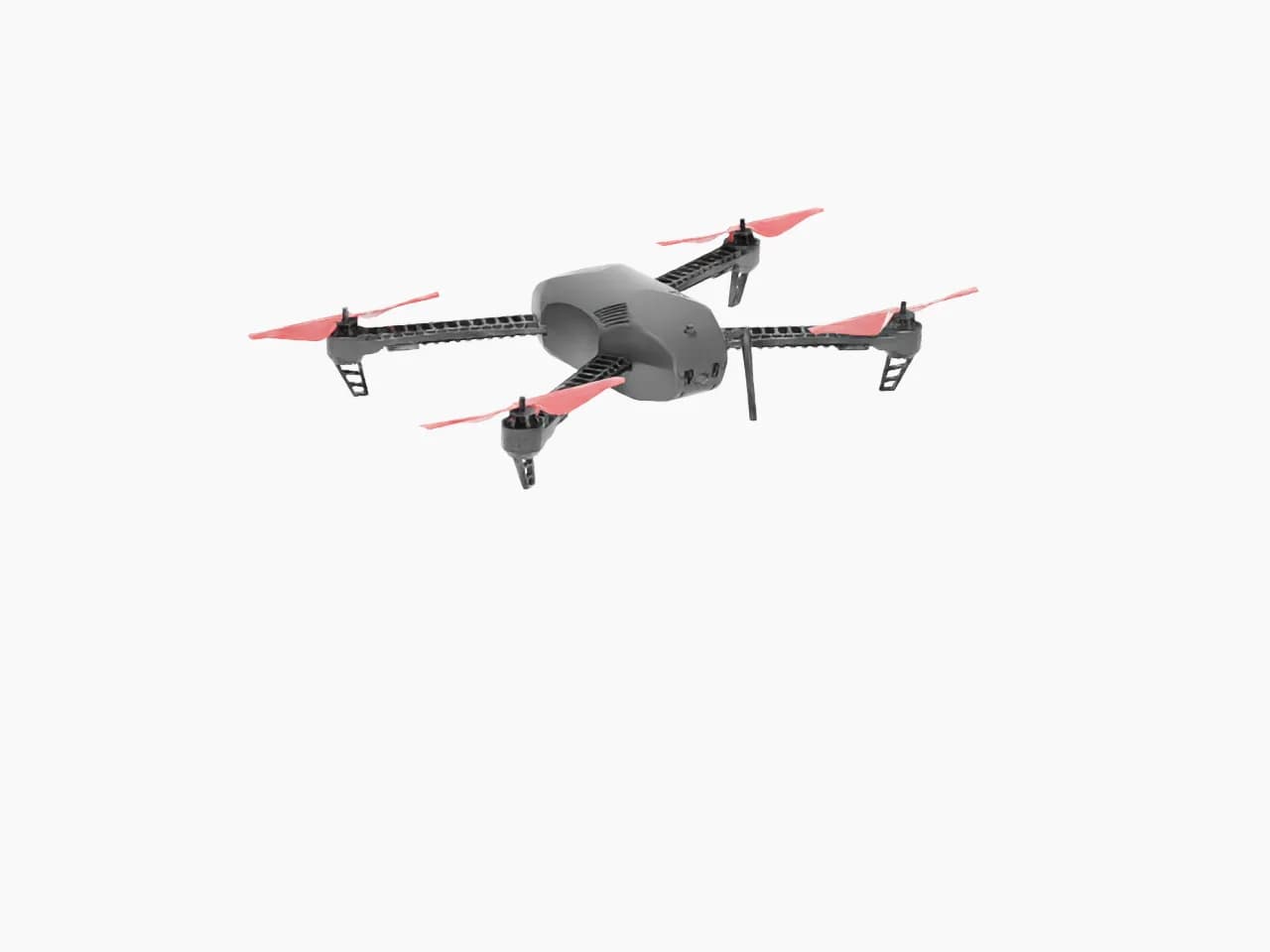
Live digital twin
Drag to orbit. This is the real closed-loop mission, not an animation.
Real closed-loop mission — takeoff, 2 m hover, climb to 5 m, descent, landing. FMU flight controller + Isaac Sim physics, recorded co-sim states resampled to 10 Hz · 2× playback · no keyframes.
AI & agents
The Workshop is API-first: every capability is a typed operation that people, the in-app assistant and external agents call through the same path.
The assistant can import components from suppliers and help finish a part record in the library.
An embedded MCP server lets AI agents operate the app over API-key-secured JSON-RPC.
Component search, read, import, propose and approve, simulation start, CFD solve and scene import are published as Provider Interface operations.
Capabilities
Four working areas around one component warehouse.
Three layers of abstraction — a function taxonomy, reusable modules, atomic SKUs with strict interfaces — so the same component can sit in different modules and the same module can fulfil different functions.
Optional parameter schemas per class (for example motor.bldc, sensor.imu, valve.solenoid) validate a part’s specification across mechanical, electrical, electronic, fluidic and software domains.
Thumbnails, USD 3D models, datasheets, EDA schematics and PCBs attached to the component record.
Components imported from distributor APIs such as DigiKey, or from shop pages without an API through LLM-driven extraction against the component schema — one code path for the UI, the in-app agent and external agents.
Blocks, sources, sinks, clocks, scope taps and sw↔hw adaptors wired with the library’s parts into a running system.
One Swarm service per container node on a shared overlay; live signal values stream to the canvas and the scopes.
Change a single node from MIL to SIL or HIL on a running stack; Swarm performs a rolling update while the run continues.
Author an external-aerodynamics case, launch a solve and watch it converge live — geometry, surface-pressure field and residual and force charts, inside the Workshop.
A workspace links system diagrams, CFD cases and referenced library components without owning them — the same record can belong to more than one workspace.
A project’s product decomposed into assemblies and parts, with part numbers, revisions, quantities, links to library components and a flat BOM export — including parts that are never simulated, such as fasteners and purchased items.
Trust
Inbound parts never overwrite a curated one, and every run that reaches the twin is checked on the GPU.
Components move proposed → active → deprecated → obsolete, with rejected as a terminal state; illegal transitions are refused.
Parts that arrive from another application carry their source application and reference; consumers never see uncurated parts unless they ask.
The GPU end-to-end suite — reachability, level hover, analytic agreement, camera frame — runs on every merge to the airframe bridge.
Bridge endpoints for SIL and HIL adaptors are DNS-resolved and refused if they point at loopback, private, link-local or metadata addresses unless explicitly allowlisted.
In the digital thread
DjiniousWorkshop does its part of the engineering loop and passes its evidence along — and it works just as well on its own.
DjiniousWorkshopSystem integrationOn its own, DjiniousWorkshop is a component warehouse and a co-simulation bench: bring a real part list, wire it, close the loop through Isaac Sim and see the physics.
Use cases
1 worked case.
Book a demo
Watch a design meet real physics. Bring a real part list — we’ll wire it, close the loop through Isaac Sim, and show you the physics.
Along the thread
 DjiniousEngineeringOrchestration
The AI systems engineer: it takes the assignment and carries the whole project through a traceable System Ledger.
 DjiniousLabModelling & simulation
Multi-domain system models, digital replicas and a mathematical toolbox, driven by AI.
 DjiniousSafeCertifiable code
Lean 4 specifications and kernel-checked proofs turned into panic-free embedded Rust, up to SIL 4.
 DjiniousWorkflowAgent automation
Graph automation any stage can call on: build a process, run it, watch it and audit it.